





Starting an online store is exciting. But picking the right platform? That’s where many Louisiana business owners get stuck. Whether you need e-commerce solutions or a complete redesign, choosing the right platform is crucial.
The WordPress vs Shopify debate is real. You’ve probably heard about both platforms. Both are popular. Both can help you sell online. But they work very differently.
In this guide, we’ll break down everything you need to know. No tech jargon. No confusing terms. Just clear answers to help you make the right choice for your Louisiana business.
What is Shopify?
Think of Shopify as a complete store in a box.
When you sign up for Shopify, you get everything you need to start selling:
- A website builder
- Shopping cart tools
- Payment processing
- Hosting (where your website lives)
- Security features
- Customer support
You don’t need to piece things together. Everything works from day one.
Shopify was built for one thing: selling products online. That’s it. And they’re really good at it.
More than 4 million stores worldwide use Shopify. From small shops in Baton Rouge to big brands like Gymshark and Allbirds.
How it works:
- You pick a plan (starting at $29 per month)
- Choose a design for your store
- Add your products
- Start selling
No coding needed. No technical setup. Just simple steps. Want to get started? Check out our guide on how to design a Shopify website step by step.
What is WordPress?
WordPress is different. It started as a blogging tool back in 2003. Today, it powers 43% of all websites on the internet. But here’s the key thing: WordPress by itself doesn’t have shopping features.
To sell products, you need to add a plugin called WooCommerce. Think of plugins as apps that add new features to WordPress.
The WordPress + WooCommerce combo gives you:
- A website you fully control
- Unlimited customization options
- Thousands of free and paid add-ons
- Complete flexibility
But there’s a catch. You have to set everything up yourself. Or hire someone to do it.
You need to:
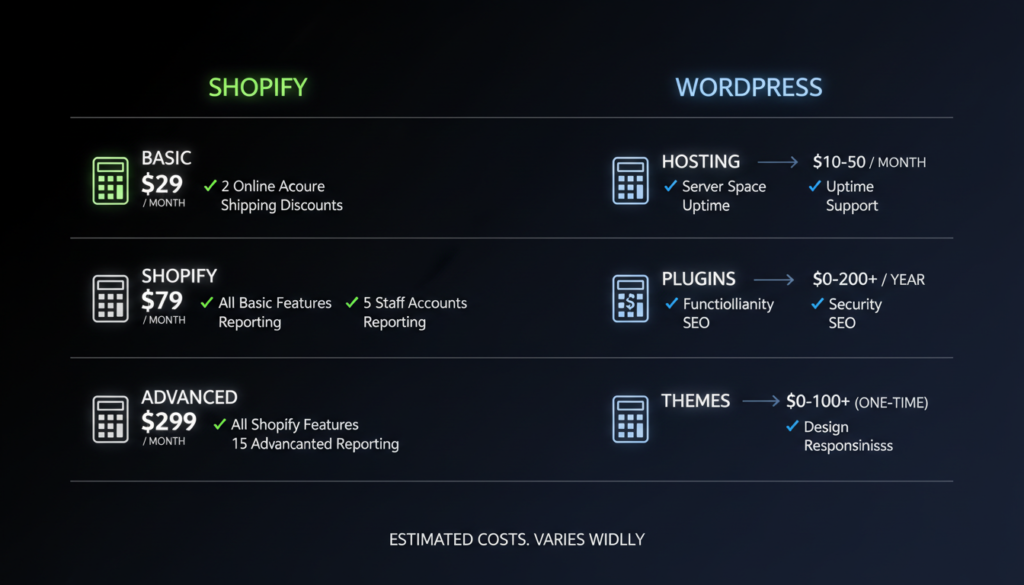
- Buy hosting (typically $10-50 per month)
- Install WordPress
- Add WooCommerce
- Pick a theme (design)
- Configure payment methods
- Set up security
It takes more work. But you get more control.
The Key Difference Between WordPress and Shopify
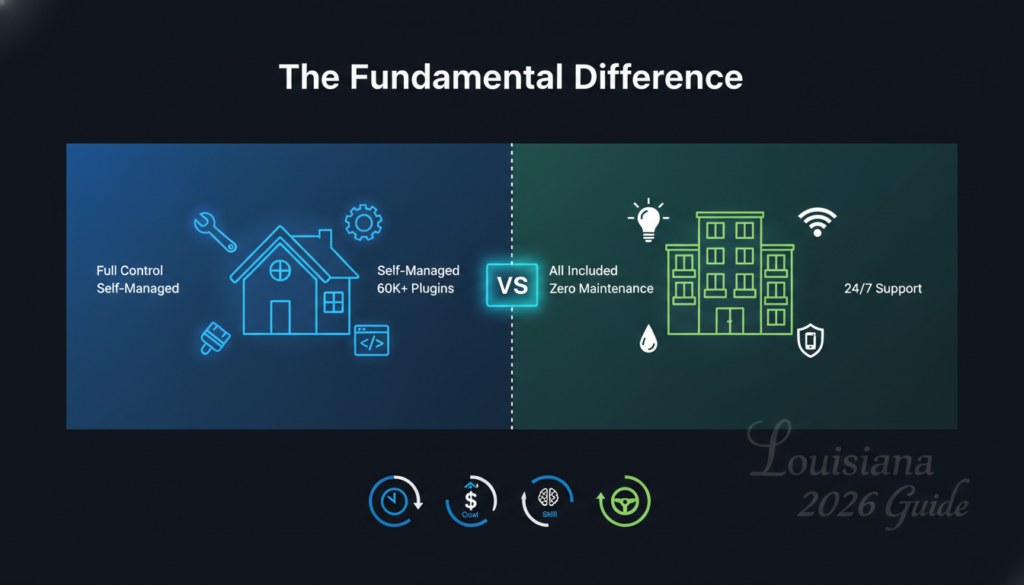
Here’s the simplest way to understand it:
Shopify = Renting an apartment. Everything is ready. Utilities included. Maintenance handled. You just move in and start living. But you follow the landlord’s rules.
WordPress = Buying a house. You own it. You can paint any wall any color. Knock down walls. Build additions. But you handle all repairs. You pay all bills. You’re in charge of everything.
Both work. The right choice depends on what you need.
Detailed Comparison: WordPress vs Shopify
Let’s compare both platforms across everything that matters for your Louisiana business.
Pricing: What You’ll Really Pay
Shopify Pricing
| Plan | Monthly Cost | Transaction Fees | Best For |
| Basic | $29 | 2.9% + 30¢ per sale | New stores |
| Shopify | $79 | 2.7% + 30¢ per sale | Growing businesses |
| Advanced | $299 | 2.5% + 30¢ per sale | Large stores |
| Plus | $2,300+ | 2.15% + 30¢ per sale | Enterprise brands |
What’s included in every Shopify plan:
- Unlimited products
- Website hosting
- SSL certificate (security)
- 24/7 customer support
- Abandoned cart recovery
- Discount codes
- Gift cards
- Professional reports
Extra costs to consider:
- Premium themes: $140-$350 (one-time)
- Apps: $0-$300+ per month
- Custom domain: $14 per year
- Email marketing: $15-$100+ per month
Real first-year cost for most Louisiana small businesses: $600-$1,500
WordPress + WooCommerce Pricing
WordPress itself is free. WooCommerce is free. But you still pay for:
| Item | Cost | Required? |
| Hosting | $10-$100/month | Yes |
| Domain name | $10-$15/year | Yes |
| SSL certificate | $0-$70/year | Yes |
| Premium theme | $30-$100 | Optional but recommended |
| Essential plugins | $0-$200/year | Some needed |
| Maintenance | $0-$100/month | DIY or hire help |
Payment processing: No platform fees. But you pay payment processor fees (usually 2.9% + 30¢ per sale through Stripe or PayPal).
Real first-year cost for most Louisiana small businesses: $500-$2,000
The range is bigger because it depends on:
- How much do you do yourself
- The quality of the hosting you choose
- How many paid plugins do you need
Cost Winner: WordPress is cheaper if you have technical skills. Shopify is more predictable with fewer surprises.
Ease of Use: Which is Easier to Learn?
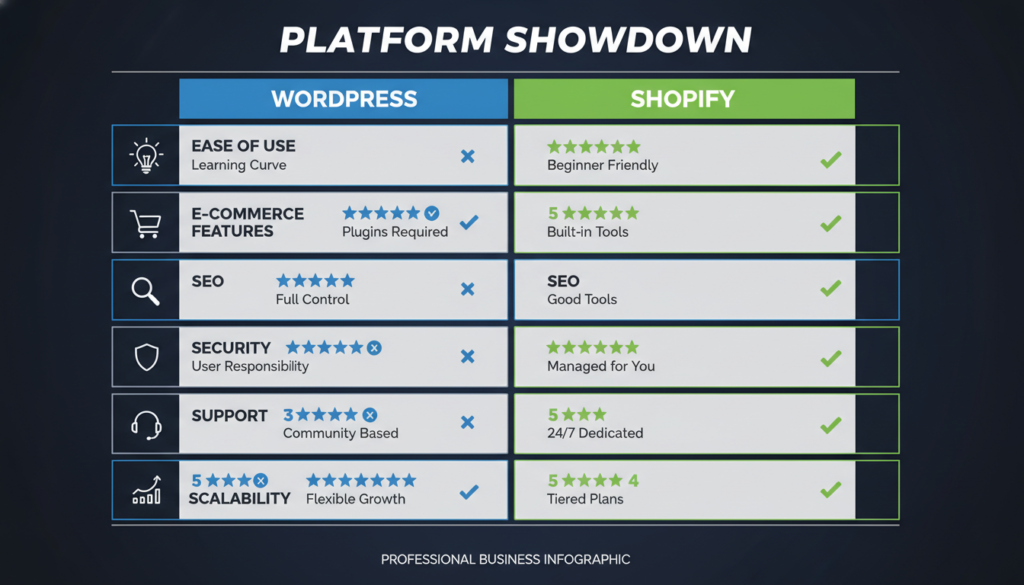
Shopify Ease of Use: 9/10
Shopify is built for people who aren’t tech experts.
The setup process is smooth:
- Enter your email and create a password
- Answer a few questions about your business
- Pick a theme (design template)
- Add your products
- Connect a payment method
- You’re live
Most Louisiana business owners can launch a Shopify store in one weekend. No coding. No confusing technical terms.
The dashboard is clean. Everything is labeled clearly. When you need help, there are video tutorials for every feature.
Example: Adding a product takes 2 minutes. Upload a photo, write a description, and set a price. Done.
WordPress Ease of Use: 5/10
WordPress has a steeper learning curve.
First, you need to understand:
- What hosting is and how to buy it
- How to install WordPress
- How plugins work
- How themes change your site’s look
- How to configure WooCommerce settings
Even simple tasks can be confusing at first.
Example: Adding a product requires navigating to Products > Add New, filling in multiple fields, setting categories, tags, and attributes, then publishing.
There are more steps. More options. More places where things can go wrong. But once you learn it? You can do almost anything.
Ease Winner: Shopify wins by a mile. It’s designed for beginners. WordPress requires learning and patience.
E-commerce Features: What Can Each Platform Do?
Shopify E-commerce Features
Built for selling. Here’s what you get:
Product Management:
- Unlimited products (on all plans)
- Product variants (sizes, colors, styles)
- Inventory tracking across locations
- Low stock alerts
- Bulk product editing
- Product reviews
Selling Tools:
- Discount codes and automatic discounts
- Gift cards
- Abandoned cart recovery (automatically emails customers who didn’t finish buying)
- Buy now, pay later options (Shop Pay Installments)
- Product recommendations
- Multi-currency support
Sales Channels: Sell everywhere from one dashboard:
- Your online store
- Facebook and Instagram shops
- TikTok Shop
- Amazon
- eBay
- Walmart Marketplace
- In-person with Shopify POS (great for Louisiana farmers’ markets and festivals)
Marketing Features:
- Email marketing (built-in)
- SEO tools
- Blog
- Social media integration
- Google Shopping integration
- Discount pop-ups
Our e-commerce design & development services help you leverage these features effectively. For Louisiana businesses: The POS system is huge. Sell at Jazz Fest, Farmers Markets, or your brick-and-mortar store. All inventory syncs automatically.
WordPress + WooCommerce E-commerce Features
WooCommerce gives you the basics:
Product Management:
- Unlimited products
- Product variations
- Digital and physical products
- Inventory management
- Product reviews
- Stock notifications
Selling Tools:
- Coupon codes
- Tax calculations
- Shipping options
- Multiple payment gateways (140+ options)
- Product bundles (with plugins)
- Subscriptions (with plugins)
What’s Missing (but can be added with plugins):
- Abandoned cart recovery (requires paid plugin)
- Multi-channel selling (requires separate plugins)
- Advanced inventory (requires paid plugin)
- Email marketing (requires separate service)
- POS system (requires paid plugin)
The Plugin Problem: WordPress can do almost anything Shopify does. But you need to find, install, and configure multiple plugins. Each plugin:
- May cost money
- Needs updates
- Could have security issues
- Might conflict with other plugins
For Louisiana businesses: Great if you sell complex products (custom jewelry, B2B wholesale) or need special features that require customization.
E-commerce Winner: Shopify. Everything works out of the box. WordPress needs plugins to match features.
Design and Customization
Shopify Design Options
Shopify offers:
- 12 free themes
- 170+ paid themes ($140-$350)
- All themes are mobile-responsive
- Drag-and-drop customization
- No coding required for basic changes
The themes look professional. They’re designed specifically for online stores.
Customization limits: You can change colors, fonts, images, and layout sections easily. But deep customization requires coding (Liquid, Shopify’s template language).
Want a completely unique design? You’ll need to hire a Shopify developer.
Good for: Louisiana businesses that want to look professional quickly without hiring a designer.
WordPress Design Options
WordPress offers:
- 11,000+ free themes
- Thousands of premium themes ($30-$200)
- Page builders like Elementor (drag-and-drop)
- Complete code access
You can change anything literally. The sky’s the limit.
Customization freedom: Want your product page to look completely different? Easy. Want to add custom features? Possible. Want your site to work in a unique way? You can do it.
But this freedom comes with responsibility. Bad customization can break your site.
Good for: Louisiana businesses with specific design needs or unique branding that requires custom work.
Design Winner: WordPress for unlimited customization. Shopify for ease and professional looks without effort.
SEO: Which Ranks Better on Google?
This is important. Good SEO means free traffic from Google.
WordPress SEO Strengths
WordPress is an SEO powerhouse:
Technical SEO Control:
- Complete control over URLs
- Easy to optimize site speed
- Full access to edit code
- Can implement any schema markup
- Better internal linking options
- More control over site structure
SEO Plugins:
- Yoast SEO (free, comprehensive)
- Rank Math (free, powerful)
- All-in-One SEO (easy to use)
These plugins help you:
- Optimize every page
- Create XML sitemaps
- Add meta descriptions
- Generate schema markup
- Track keyword usage
Content Advantage: WordPress started as a blogging platform. It excels at content creation. This matters because:
- Google loves helpful content
- Blogs attract organic traffic
- More content = more ways to rank
For Louisiana businesses: If your strategy is “rank on Google for Louisiana + product searches,” WordPress gives you more tools. Learn more on-page SEO best practices to maximize your WordPress SEO potential.
Shopify SEO Features
Shopify has basic SEO:
What works well:
- Fast loading speeds (Shopify handles optimization)
- Mobile-responsive themes
- Automatic sitemaps
- SSL certificates included
- Can edit title tags and meta descriptions
- Alt text for images
- Built-in blog
SEO Limitations:
- URL structure restrictions (product URLs include /products/)
- Limited control over site structure
- Fewer internal linking options
- Basic blogging features
- Can’t easily implement an advanced schema
Shopify won’t hurt your SEO. But it doesn’t give you advanced optimization options.
For Louisiana businesses: Fine if you’re doing paid ads and social media marketing. Not ideal if organic Google traffic is your main strategy. Either way, our SEO optimization services ensure your store ranks well.
SEO Winner: WordPress. Better for Louisiana businesses focused on ranking for local searches like “Cajun spice shop Louisiana” or “handmade jewelry Baton Rouge.”
Scalability: Can it Grow With Your Business?
Shopify Scalability
Shopify is built to scale:
- Handles unlimited traffic (your site won’t crash during busy times)
- Manages thousands of products easily
- Supports high-order volumes
- Shopify Plus for enterprise needs
- Global CDN for fast loading worldwide
Real example: A Louisiana hot sauce company starts with 10 products. Five years later, they’re selling 500 products, shipping worldwide, and processing 1,000 orders per day. Their Shopify store handles it without technical changes.
You just upgrade your plan as you grow.
WordPress Scalability
WordPress can scale. But it depends on your hosting.
The hosting factor:
- Cheap hosting ($10/month): Can’t handle much traffic
- Good hosting ($50/month): Handles moderate traffic
- Premium hosting ($200+/month): Handles high traffic
As you grow, you’ll need:
- Better hosting
- Caching plugins
- Database optimization
- Possible developer help
Real example: A Louisiana gift shop starts on cheap hosting. As they grow, their site gets slower. They need to upgrade hosting, optimize their database, add caching, and maybe hire a developer. More complex than Shopify.
Scalability Winner: Shopify. Growing is simple. WordPress requires more technical management.
Apps and Extensions
Shopify App Store
Shopify has 8,000+ apps:
Popular categories:
- Email marketing
- Product reviews
- SMS marketing
- Inventory management
- Dropshipping
- Subscription billing
- Loyalty programs
- Upselling tools
Cost: Most apps charge $10-$100 per month.
Quality: All apps are reviewed by Shopify. They meet quality standards.
Example apps Louisiana businesses love:
- Route (package protection)
- Oberlo (dropshipping)
- Klaviyo (email marketing)
- Smile (loyalty programs)
- ReCharge (subscriptions)
WordPress Plugin Directory
WordPress has 60,000+ plugins:
The good:
- More options
- Many free plugins
- Can do almost anything
The bad:
- Quality varies wildly
- Security risks with bad plugins
- Plugins can conflict
- Some aren’t updated regularly
Popular WooCommerce plugins:
- WooCommerce Subscriptions (recurring billing)
- WooCommerce Bookings (appointments)
- YITH plugins (various features)
- Stripe payment gateway
- Mailchimp for WooCommerce
Cost: Free to $200+ per year per plugin.
Apps Winner: Shopify for quality and reliability. WordPress offers a variety of free options.
Security and Maintenance
Shopify Security
Shopify handles everything:
- SSL certificates (included free)
- PCI compliance (credit card security)
- Automatic security updates
- DDoS protection
- Fraud analysis
- Automatic backups
- 99.98% uptime guarantee
You do nothing. Your store is secure and updated automatically.
For Louisiana businesses: Peace of mind. You focus on selling, not security patches.
WordPress Security
You’re responsible for security:
What you must do:
- Update WordPress regularly
- Update plugins regularly
- Update themes regularly
- Install security plugins
- Set up backups
- Monitor for malware
- Use strong passwords
- Keep hosting secure
Miss an update? Your site could get hacked.
Cost of security plugins: $0-$200 per year
Good options:
- Wordfence (free version available)
- Sucuri (paid, comprehensive)
- iThemes Security (free version available)
Follow comprehensive website security best practices to keep your WordPress site safe.
For Louisiana businesses: More work, but you control your security approach.
Security Winner: Shopify. Zero maintenance required.
Customer Support
Shopify Support
Available 24/7:
- Phone support
- Live chat
- Email support
- Help center with articles
- Video tutorials
- Community forums
- Shopify Academy (free courses)
Response times:
- Chat: Usually under 2 minutes
- Phone: Immediate
- Email: Within 24 hours
For Louisiana businesses: Call support at 2 AM if your site breaks. Someone answers.
WordPress Support
No central support:
- Community forums (help from other users)
- Your hosting company’s support (varies in quality)
- Plugin developers (if you pay for premium plugins)
- Freelance developers (you pay hourly)
The reality: When something breaks, you’re Googling for answers or posting in forums hoping someone responds.
For Louisiana businesses: Fine if you’re tech-savvy. Frustrating if you’re not.
Support Winner: Shopify. Reliable help when you need it.
Payment Processing
Shopify Payments
Shopify built its own payment system:
Rates with Shopify Payments:
- Basic Plan: 2.9% + 30¢ per transaction
- Shopify Plan: 2.7% + 30¢
- Advanced Plan: 2.5% + 30¢
Benefits:
- No transaction fees
- Faster payouts
- Shop Pay (one-click checkout)
- Fraud protection included
- Everything in one dashboard
Other payment options: You can use PayPal, Stripe, or others. But Shopify charges an extra 0.5-2% transaction fee.
For Louisiana businesses: Shopify Payments is the best deal if you qualify (works for most US businesses).
WordPress/WooCommerce Payments
Complete flexibility:
No platform fees ever. Connect any payment gateway:
- Stripe: 2.9% + 30¢
- PayPal: 2.9% + 30¢
- Square: 2.9% + 30¢
- Authorize.net
- 140+ other options
Benefits:
- Choose the cheapest processor
- Use multiple processors
- Negotiate rates with processors
- Keep payment data on your server (if you want)
For Louisiana businesses: More freedom, especially if you already have merchant accounts with special rates.
Payment Winner: WordPress for flexibility. Shopify for simplicity.
Decision Framework: Choosing Between WordPress and Shopify
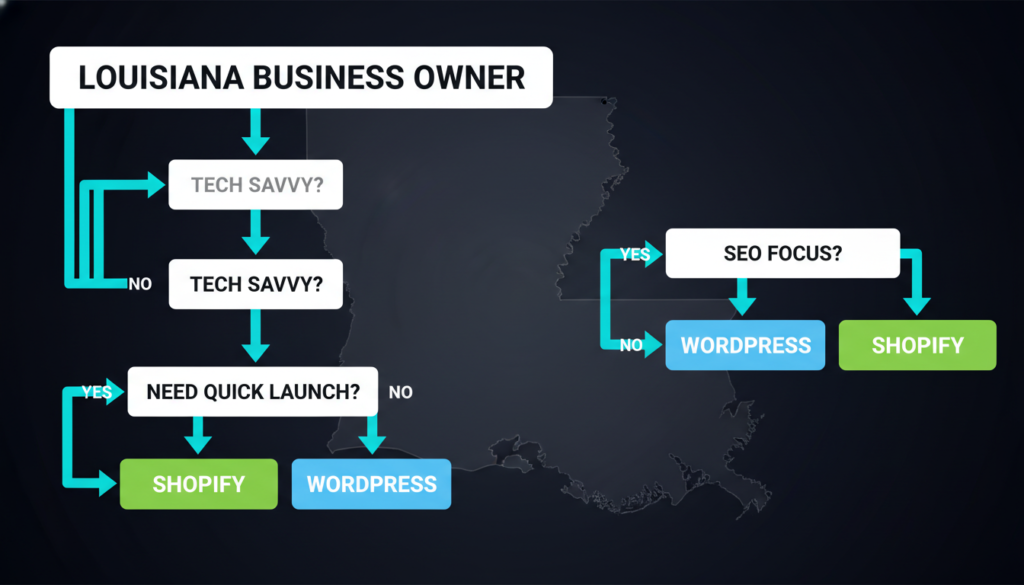
Answer these questions honestly:
Question 1: What’s your technical skill level?
Not tech-savvy (never built a website): → Choose Shopify
Comfortable with technology (can figure things out): → Either platform works
Technical expert (knows coding, hosting, servers): → WordPress gives you more control
Question 2: What’s your main goal?
Sell products quickly: → Shopify.
Build a content-rich site with a store: → WordPress
Rank high on Google through content: → WordPress
Sell on social media: → Shopify
Question 3: How much time can you invest?
Need to launch fast (days/weeks): → Shopify
Can spend months perfecting: → WordPress
Don’t want ongoing maintenance: → Shopify
Happy to manage technical stuff: → WordPress
Question 4: What’s your budget?
Want predictable costs: → Shopify.y
Want to minimize monthly costs: → WordPress (if you do work yourself)
Can afford $50-100/month: → Either works
Very tight budget (under $30/month): → WordPress on cheap hosting
Question 5: Do you have a physical location?
Yes, and I want synced inventory: → Shopify (POS system)
Yes, but separate from online: → Either works
No, online only: → Either works
Question 6: How important is customization?
Want a unique, custom design: → WordPress
Professional templates are fine: → Shopify
Need custom features: → WordPress
Standard e-commerce features work: → Shopify
Question 7: What’s your growth plan?
Start small, might stay small: → Either works
Plan to scale fast: → Shopify
Complex business needs emerging: → WordPress
Want to sell everywhere (social, Amazon, etc.): → Shopify
Common Questions Louisiana Business Owners Ask
Can I switch platforms later if I choose wrong?
Yes. Both directions are possible. Shopify to WordPress is harder and more expensive. WordPress to Shopify is easier with good migration tools.
Don’t let fear of choosing wrong stop you. It’s better to start somewhere than wait forever.
Which is better for Louisiana small businesses with limited budgets?
If you’re tech-savvy, WordPress is cheaper.
If you’re not technical, Shopify prevents expensive mistakes. The extra cost is worth it.
A broken WordPress site costs more to fix than Shopify’s monthly fee.
Do I need a developer for either platform?
Shopify: No. Most businesses never need a developer.
WordPress: Not required, but common. Many businesses hire help for initial setup or customization.
Which platform is better for local Louisiana SEO?
WordPress gives you more SEO control. But here’s the secret: Both can rank well for local Louisiana searches.
The difference is:
- Shopify: Good enough for most businesses
- WordPress: Better for content-heavy SEO strategies
“Handmade jewelry New Orleans” can rank on either platform with good content and local SEO basics.
Can I use both platforms together?
Yes! Some Louisiana businesses use:
- WordPress for their main site and content
- Shopify Buy Button for products
Or:
- Shopify for their store
- WordPress blog on a subdomain for content marketing
What about Wix and Squarespace?
Both are easier than WordPress but more limited.
Quick comparison:
- Wix: Easier than WordPress, less powerful than Shopify for e-commerce
- Squarespace: Beautiful designs, okay for small stores, limited as you grow
- Shopify: Best for serious e-commerce
- WordPress: Best for flexibility and control
Also consider Webflow design as a modern alternative between WordPress flexibility and Shopify simplicity. For Louisiana e-commerce businesses, Shopify or WordPress are better long-term choice.
How do Louisiana tax laws work with each platform?
Both platforms handle Louisiana sales tax:
Shopify:
- Set up tax rates once
- Automatically calculates tax
- Reports available
WordPress/WooCommerce:
- Manual tax rate setup
- Requires configuration
- WThe ooCommerce Tax plugin helps
Louisiana sales tax: 4.45% state + local parish rates
Both platforms can handle Louisiana’s complex tax system. Shopify is slightly easier to configure.
Which platform is better for selling at Louisiana festivals and events?
Shopify wins.
Shopify POS lets you:
- Accept card payments on phone/tablet
- Track inventory in real-time
- Sync with the online store
- Print receipts
Perfect for:
- Jazz Fest
- French Quarter Festival
- Farmers markets across Louisiana
- Holiday markets
- Craft fairs
WordPress POS solutions exist, but aren’t as seamless.
Final Thoughts for Louisiana Business Owners
Starting an online store is exciting. You’re taking your Louisiana business to new customers across the state and beyond.
The WordPress vs Shopify decision matters. But here’s what you need to know: it’s not a permanent choice. You can always switch later if your needs change.
What really matters right now:
First, just start. Don’t wait for the perfect platform. Waiting costs you money every day. Your competitors are already selling online.
Second, choose based on what you need today, not what you might need in five years. Your business will change. Your platform can change with it.
Third, focus on what actually drives success: great products, happy customers, and smart marketing. The platform is just a tool.
Fourth, remember you can switch platforms later. Many successful businesses have migrated from one platform to another as they have grown.