

Home / Blog Details
Take your digital marketing to the next level with data-driven strategies and innovative solutions. Let’s create something amazing together!


From Google search results to AI chatbots, we optimize your website so customers can find you faster — and choose you over competitors.
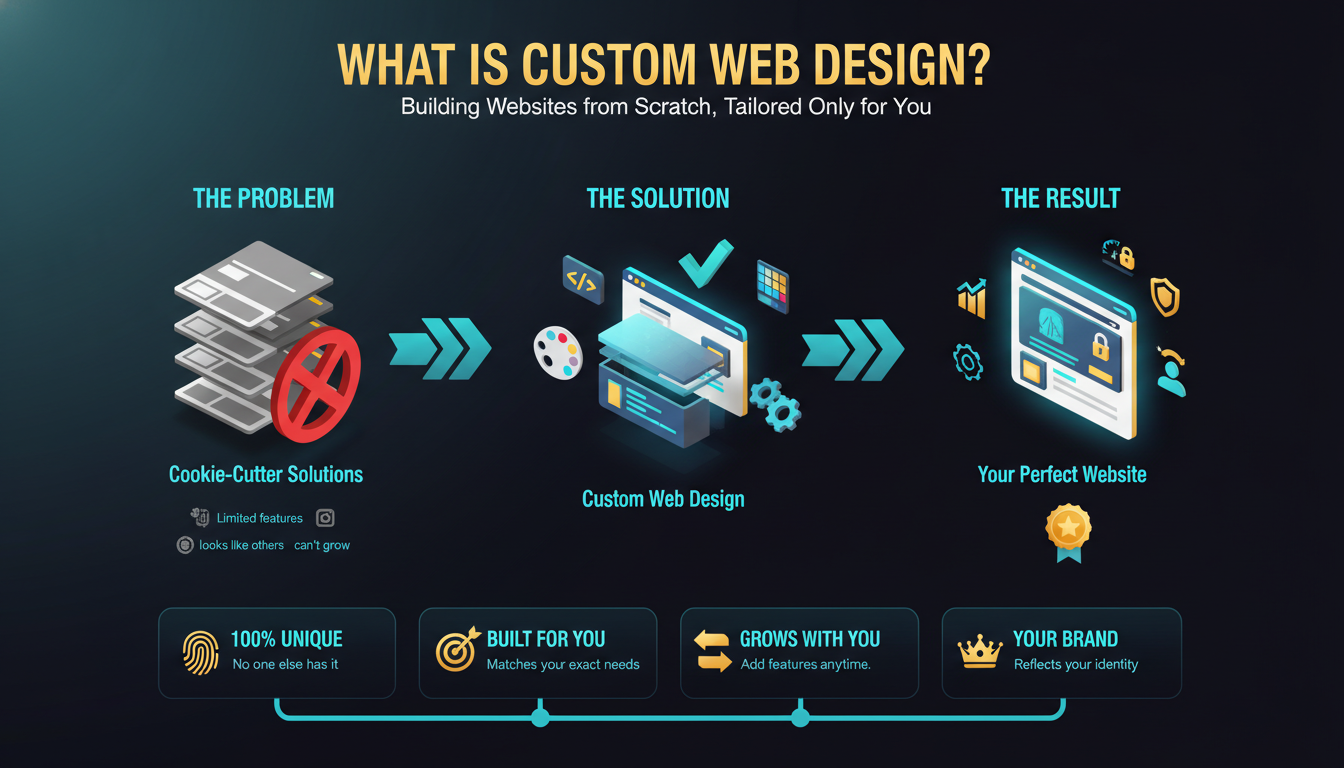
Custom web design is the process of building a website from scratch, designed specifically around a business’s goals, brand identity, audience, and functional needs. Unlike template-based websites, every element is planned and built intentionally. The result is a unique, high-performing website that reflects your business and supports long-term growth.
Your website is often the first impression your business makes. If it looks like every other template site, loads slowly, or fails to guide visitors toward action, you are losing customers before you even get the chance to speak with them. For small businesses, law firms, healthcare practices, and local service companies in Lafayette, Louisiana, that problem is real and costly.
Most business owners underestimate how much their website affects sales. Research from Stanford University found that 75% of users judge a company’s credibility based on website design alone. A generic, out-of-the-box template rarely communicates the trust, professionalism, or uniqueness your business deserves.
This guide covers everything you need to know about custom web design: what it is, how it works, who needs it, what it costs, and how to find the right agency for your project. By the end, you will have a clear picture of whether a custom website is the right investment for your business in 2025.
Custom web design is the practice of designing and developing a website entirely from scratch, tailored specifically to a single business. No pre-built templates, no borrowed layouts, no generic color schemes shared with competing businesses.
Every page, every button, every content block is planned with your brand, your audience, and your goals in mind. A custom site is built to solve your specific business problems, not to fill a pre-existing structure.
The process starts with a discovery phase. A designer and strategist study your business, your competitors, and your target audience. From there, they develop a site strategy, create wireframes, design the visual interface, and build each page with clean, optimized code.
Unlike a template website that can be set up in days, a custom project involves research, iteration, and craftsmanship. It typically takes 6 to 16 weeks depending on complexity.
The purpose is to build a digital asset that works as hard as your best salesperson. A well-built custom website attracts organic traffic, builds immediate trust, guides visitors through a clear journey, and converts them into leads or customers.
For local businesses in Lafayette, the purpose often includes ranking in Google’s local search results, converting mobile visitors, and standing out in a competitive service market.
A custom website shares several recognizable traits:
These characteristics separate a custom site from a site launched on Squarespace, Wix, or an unmodified WordPress theme.
Yes, significantly. Template websites use shared layouts. Thousands of businesses use the same theme, the same section order, and the same visual patterns. Visitors notice this more than business owners realize.
A custom website reflects your brand from the first pixel. Your colors, fonts, imagery style, and messaging structure are built to communicate exactly who you are and who you serve. In a market like Lafayette where personal trust drives buying decisions, that differentiation matters.
Templates limit what you can change. You work within the designer’s constraints, not your own. Adding a booking system, a customer portal, or a custom product filter often requires workarounds that slow your site or break on mobile.
Custom development removes those limits. You define the features. The developer builds them exactly as your business needs them, from the start.
Think of a template website like a prefabricated house. It works fine at first, but expanding it later is complicated and often more expensive than building correctly from the start.
A custom website is designed with your growth path in mind. Need to add a client portal in two years? A custom build can accommodate that without rebuilding the entire site.
Yes, and they are meaningful. Custom websites are built with clean, semantic HTML code. Template sites often carry unnecessary code bloat from unused features, which slows load times and hurts Core Web Vitals scores.
Google uses Core Web Vitals as a ranking signal. A faster, cleaner site has a structural SEO advantage over a slower template site, all else being equal. (Source: Google Search Central, 2024)
Template platforms and heavily plugged WordPress installations create multiple attack surfaces. Each third-party plugin is a potential vulnerability.
Custom websites carry lower plugin dependency, which reduces security exposure. Maintenance is also more predictable. You are not chasing plugin update conflicts or dealing with theme breakages every few months.
Long-term, the total cost of a custom site often competes favorably with a template site that requires ongoing subscriptions, paid plugins, and frequent redesigns.
Web design covers the visual and experiential layer of a website. This includes layout planning, color palettes, typography, imagery, button styles, spacing, and the overall user experience (UX). Designers determine how visitors feel when they land on your site and how easy it is to find what they need.
Good design is strategic, not just decorative. It guides the visitor’s eye, creates trust, and moves users toward action.
Web development is the technical layer. Developers write the code that makes the design functional. Front-end development handles what users see and interact with in their browser. Back-end development manages databases, server logic, and behind-the-scenes processes.
Together, these disciplines turn a visual design into a working, live website.
Design and development are separate disciplines, but they depend on each other completely. A beautiful design that is poorly built will load slowly and break on mobile. Technically sound code built around a poor design will lose visitors within seconds.
In a quality custom web project, designers and developers communicate throughout the process, not just at handoff. The result is a site that looks great and performs even better.
Most businesses need both. If you are starting from scratch or fully rebuilding, you need a full custom web design and development engagement.
If your existing site is technically sound but visually outdated, a redesign focused on the design layer may be enough. A good agency will assess your needs honestly before recommending a scope of work.
Absolutely. Your website is your most visible brand asset. A custom site communicates professionalism, attention to detail, and investment in the customer experience. That perception directly affects whether a visitor trusts you enough to call, book, or buy.
For industries like law, healthcare, and financial services, credibility is non-negotiable. A generic template sends the wrong signal in those fields.
Custom design lets you map the exact journey you want visitors to take. Where should they go after the homepage? What should they do after reading your service page? Every click path can be designed intentionally.
Better navigation reduces bounce rates, increases time on site, and improves the signals Google uses to evaluate page quality.
Yes. Custom sites are built with only the code they need. There is no template overhead, no unused CSS, no unnecessary scripts loading in the background. Pages load faster, Largest Contentful Paint (LCP) scores improve, and Cumulative Layout Shift (CLS) problems are avoided by design.
These technical improvements directly support higher search rankings. Google’s documentation confirms that Core Web Vitals influence page experience signals used in ranking. (Source: Google Search Central)
Conversion is a function of trust, clarity, and friction. Custom design reduces friction by putting the right information in the right place. It builds trust through professional presentation. It adds clarity through deliberate calls to action.
Even a 1% improvement in conversion rate on 500 monthly visitors can mean 5 additional leads per month, which adds up significantly over a year.
Custom sites start with cleaner code, better page structure, and more deliberate internal linking. Heading hierarchies are built correctly from the start. URLs are structured for clarity. Schema markup can be integrated into the build rather than added as an afterthought.
These foundational elements give your SEO work a stronger base to build on.
Your competitors are likely using shared templates. A custom website immediately differentiates you at the visual level, but the advantage goes deeper. Better speed, better UX, and better SEO all contribute to capturing market share in organic search results.
For local businesses in Lafayette competing for the same customer base, that edge is meaningful and measurable.
A custom website is a scalable business asset. As your service offerings expand, your audience grows, or your marketing strategy evolves, a custom site can grow with you. It does not box you into a template’s limitations or require a full rebuild every two to three years.
That flexibility pays dividends across your entire digital marketing investment.
Small businesses with growth ambitions absolutely benefit from custom websites. The investment levels the playing field against larger competitors, especially in organic search. A small HVAC company with a fast, well-designed custom website can outrank a national chain for local service searches.
Local service businesses, including plumbers, electricians, landscapers, and contractors, depend on local search visibility. A custom website built with local SEO in mind, including location pages, service area content, and schema markup, directly supports that visibility in ways a template rarely achieves out of the box.
Yes, particularly because of compliance and trust requirements. Healthcare websites need HIPAA-aware contact forms, accessibility compliance (ADA), and design that communicates clinical credibility. Template sites rarely address all three without significant customization, which often costs as much as building custom from the start.
Law firm websites operate in a highly competitive search landscape. Custom design allows for practice area-specific landing pages, attorney profile pages optimized for expertise signals, and content architecture that supports complex SEO strategies. Template sites limit all of these.
E-commerce stores with unique inventory systems, complex filtering requirements, or wholesale pricing tiers need custom development. Off-the-shelf platforms like Shopify work for standard stores, but growing businesses often hit platform limitations. Custom e-commerce builds eliminate those ceilings.
Organizations in these categories often serve multiple audience types: donors, students, volunteers, and the public. A custom site handles those distinct journeys far more effectively than a single-template approach. It also supports grant reporting, event management, and accessibility compliance at a level that templates rarely match.
Any business requiring custom calculators, API integrations, client portals, subscription management, complex booking flows, or multi-location directory pages needs custom web development. These requirements go beyond what any standard template or page builder can handle reliably.
Custom business website design covers the planning, design, and development of a branded informational or lead-generation website for a company. This is the most common type of custom project and the right starting point for most service businesses.
Custom ecommerce design builds a shopping experience tailored to your product catalog, brand, and customer behavior. Unlike platform templates, custom e-commerce development supports complex product structures, loyalty programs, and backend integrations with inventory or ERP systems.
WordPress powers over 43% of all websites on the internet. (Source: W3Techs, 2024) Custom WordPress design uses the platform’s infrastructure but replaces generic themes with purpose-built designs and custom functionality. This approach combines flexibility with a familiar, manageable CMS.
Enterprise web design serves organizations with complex internal structures, large content libraries, and multiple stakeholder groups. These projects involve deeper strategy, longer build timelines, and more sophisticated technical architecture than standard business website projects.
A custom landing page is a standalone page designed for one specific conversion goal, such as capturing leads, promoting a service launch, or supporting a paid ad campaign. Custom landing pages consistently outperform generic template pages because every element is optimized for one outcome.
Membership and portal sites require logged-in user experiences, content gating, account management, and sometimes payment processing. These features demand custom development. They are common in professional associations, subscription services, and businesses offering client-facing dashboards.
Mobile-responsive design is not optional in 2025 — it is a baseline requirement. Google indexes the mobile version of your site first. Custom websites are designed mobile-first, meaning the mobile experience is planned from the start, not squeezed in after the desktop version is complete.
A custom user journey maps exactly how you want different visitor types to move through your site. A first-time visitor from a Google search behaves differently than a returning client. Custom design accounts for both, placing the right calls to action at the right points in each path.
Advanced contact forms can include conditional logic (showing different fields based on user input), file upload capabilities, appointment request flows, and integrations with CRM systems like HubSpot or Salesforce. These go far beyond the basic name/email/message forms available in template sites.
Booking systems can be integrated directly into a custom build, connected to your calendar platform, and styled to match your brand. For healthcare practices, salons, law firms, and service businesses, a frictionless booking experience directly impacts conversion rates.
Customer portals allow clients to log in and access invoices, project files, service history, or exclusive content. These gated areas require custom development but significantly improve client retention and satisfaction for service-based businesses.
Custom websites can connect to virtually any third-party system with a public API: payment processors, email marketing platforms, CRMs, accounting software, live chat tools, and analytics dashboards. These integrations streamline operations and create better customer experiences.
Custom e-commerce features include dynamic product filtering, subscription billing, wholesale pricing tiers, multi-currency support, custom checkout flows, and inventory management integrations. These capabilities are built around your specific business model, not forced into a platform’s default structure.
Site architecture determines how search engines crawl and understand your content. A custom build allows for deliberate URL structures, clean internal linking, logical category hierarchies, and fast-loading page templates, all of which support stronger organic search performance.
Custom websites can be built to meet Web Content Accessibility Guidelines (WCAG) 2.1 standards, which cover color contrast, keyboard navigation, screen reader compatibility, and alternative text requirements. For healthcare and government-adjacent organizations, ADA compliance is a legal consideration, not just a best practice.
The process begins with a discovery engagement. The design team learns about your business model, your competitors, your target customers, and your goals. This phase often includes a review of your existing analytics, competitor websites, and keyword opportunity landscape.
Skipping discovery is one of the most common reasons website projects fail to meet business expectations.
Strategy translates discovery findings into a concrete plan. This includes defining site structure, identifying key conversion pages, setting performance benchmarks, and aligning the project scope with your budget and timeline. A strategy document serves as the project’s north star.
Wireframing is the process of designing the layout of each page in a simplified, visual form before any visual design begins. Wireframes establish content hierarchy, button placement, and navigation logic. Changes made at this stage cost a fraction of what they cost during development.
Good UX planning at this stage directly reduces bounce rates after launch.
Designers translate the wireframe structure into a full visual design using your brand’s colors, typography, imagery style, and voice. This phase produces mockups of key pages. You review and approve the design before development begins.
This is where your brand identity is translated into the actual experience your customers will have.
Developers take the approved designs and build functional pages using clean, semantic code. Front-end developers handle what users see. Back-end developers build any server-side functionality, database connections, or API integrations. Both work from the same approved design and functional specifications.
Before launch, the site undergoes quality assurance testing across devices, browsers, and screen sizes. Forms are tested, integrations are verified, page speed is measured, and SEO fundamentals are confirmed. Only after passing testing standards does the site move to a live server.
A strong launch process protects the investment made in design and development.
A website is not a one-time project. Software updates, security patches, content changes, and performance monitoring all require ongoing attention. Maintenance agreements with your agency ensure the site stays secure, fast, and aligned with your evolving business needs.
Search engines read code the same way a screen reader does. Semantic HTML uses specific tags (H1, H2, article, section, nav) to communicate the structure and meaning of content to Google’s crawlers. Custom builds allow developers to write clean semantic code from the start, giving every page a cleaner, more indexable structure.
Page speed is a confirmed Google ranking factor. Custom-built sites carry less code bloat than template sites, which means faster load times and better Core Web Vitals scores. Faster sites also retain visitors longer, reducing bounce rate and improving the engagement signals Google uses to evaluate quality.
Google uses mobile-first indexing. The mobile version of your site is what Google primarily crawls and ranks. Custom design prioritizes the mobile experience from the start rather than adapting a desktop design for smaller screens.
Custom builds allow you to define every URL on your site. Well-structured URLs (e.g., sitesnapps.com/services/website-design/) are more readable to both users and search engines than auto-generated slugs. Clean URLs support keyword relevance and improve click-through rates in search results.
Schema markup is structured data code that helps search engines understand the context of your content. Custom websites allow schema to be integrated directly into the page templates for LocalBusiness, FAQPage, Service, and BreadcrumbList schemas. This can improve how your site appears in search results with rich snippets.
Local SEO depends on several technical and content factors: consistent NAP (name, address, phone) data, location-specific landing pages, embedded maps, and schema markup. A custom site can be built with all of these integrated intentionally, rather than added awkwardly through plugins.
For businesses in Lafayette competing for neighborhood-level search visibility, this structural local SEO foundation is a direct competitive advantage.
Google pays attention to how users interact with your site. Long session durations, multiple page views, and low bounce rates signal that visitors found what they were looking for. Custom design creates the conditions for those behaviors by improving navigation clarity, content layout, and page load speed.
Custom builds can implement canonical tags, hreflang attributes, structured XML sitemaps, and crawl budget optimization from day one. These technical SEO elements often require complex workarounds in template environments, but they are built into the architecture of a well-developed custom site.
Lafayette businesses compete in a specific geographic market with specific customer expectations. A custom website can be built to speak directly to that audience: referencing local landmarks, addressing regional needs, and reflecting the personality of South Louisiana business culture.
Generic templates cannot do that.
Local search visibility requires more than a basic website. It requires location-specific pages, service area content, properly implemented local schema, and fast mobile performance. Custom design makes all of these possible from the start.
A Lafayette plumbing company that ranks for “emergency plumber Lafayette LA” on the first page of Google is capturing high-intent traffic that other competitors are losing.
Your website and Google Business Profile are connected signals. Google evaluates the consistency between them: matching business name, address, phone number, service descriptions, and review content. A custom website makes it straightforward to align all of this intentionally.
Strong GBP performance in Lafayette’s competitive service market depends on this kind of technical foundation.
South Louisiana customers, like customers everywhere, make split-second trust decisions online. A website that loads quickly, communicates clearly, and looks professionally built creates a credibility signal that template sites routinely fail to provide.
For law firms, medical practices, and financial services in Lafayette, that trust signal is the difference between a phone call and a bounced visitor.
In competitive service categories like HVAC, legal services, healthcare, and home improvement, differentiation matters. When every competitor uses the same Wix template or the same unmodified WordPress theme, a professionally designed custom website stands out immediately.
Customers notice. More importantly, they remember.
A custom website grows with your business. New service pages, new locations, new team members, and new marketing campaigns can all be supported by a scalable custom architecture. That long-term flexibility is especially valuable for businesses in growth markets across the Acadiana region.
Custom web design pricing varies based on several factors:
Small business custom websites in the United States typically range from $3,000 to $15,000. Enterprise-level projects can exceed $50,000. (Source: Web FX Industry Report, 2024)
A straightforward custom business website typically takes 6 to 10 weeks from discovery to launch. More complex projects involving e-commerce, membership portals, or multiple integrations often take 12 to 20 weeks.
Rushing timelines increases the risk of quality problems and missed requirements.
Clear communication and timely client decisions are the most common factors that keep projects on schedule.
A well-built custom website has a functional lifespan of 4 to 7 years. With regular maintenance and content updates, many custom sites perform effectively for even longer. Compare this to template sites, which often require full rebuilds every 2 to 3 years as platform limitations become business constraints.
If multiple items on this list describe your current website, a redesign conversation is overdue.
Regular maintenance activities include CMS and plugin updates, security monitoring, broken link audits, performance testing, and content refreshes. A monthly or quarterly maintenance agreement with your agency keeps your site current without requiring a full rebuild on an accelerated schedule.
Custom websites generate leads by combining strong SEO visibility with conversion-optimized design. When the right visitors arrive, a clear value proposition, logical navigation, and prominent calls to action guide them toward contact forms, phone calls, or bookings.
Organic search traffic through a well-optimized custom website can generate leads at a fraction of the cost per lead compared to paid advertising over time.
Yes. Every design decision on a custom website can be made with conversion in mind. Button color, form placement, headline clarity, and page load speed all affect whether a visitor takes action. A/B testing is also far easier to implement on a custom build than on a locked template.
Engaged visitors read more pages, spend more time on your site, and return more often. Custom design creates the conditions for engagement: content that is easy to read, navigation that makes sense, and visuals that match the audience’s expectations.
Higher engagement also sends positive signals to Google’s quality evaluation systems.
Template websites accumulate costs: monthly platform subscriptions, paid plugins, developer hours for workarounds, and accelerated redesign cycles. Custom sites have higher upfront costs but lower ongoing friction. Over a 5-year window, the total cost of ownership often favors the custom approach.
Key metrics for measuring website ROI include:
Google Analytics 4 and Google Search Console provide the core data needed for this analysis. Your agency should be reporting on these metrics regularly.
Ask these questions before signing any agreement:
Clear answers to these questions signal a professional, process-driven agency.
Look for agencies with demonstrated experience in your specific business type. A portfolio full of e-commerce builds does not automatically qualify an agency to build a healthcare compliance site. Industry relevance matters as much as design quality.
Also, evaluate the agency’s ability to discuss strategy, not just aesthetics. A skilled agency asks about your business goals before talking about design options.
Portfolios reveal what an agency is actually capable of producing, not what they promise. Look for consistency in quality, diversity in design approach, and evidence of performance results (load times, conversion improvements, traffic growth) where available.
Ask for live links, not just screenshots. Live sites reveal how designs hold up in real browser environments.
A professional agency provides a detailed statement of work that itemizes deliverables, revision rounds, third-party costs, and payment milestones. Avoid agencies that quote a single number without explaining what is included.
Surprises in web design projects almost always trace back to unclear scope agreements at the start.
Post-launch support is where many agencies fall short. Ask specifically how maintenance is handled, what the response time is for urgent issues, and whether ongoing SEO or content support is available.
A website that goes unsupported for 12 months is a website falling behind.
These patterns predict poor outcomes in web design engagements more reliably than any other signals.
Your business is ready for a custom website when:
A template website is a reasonable starting point for a brand-new business with a very limited budget and basic informational needs. If your only goal is to have a web presence while you validate a business concept, a template can serve that purpose temporarily.
However, businesses with established revenue, competitive markets, or growth goals quickly outgrow template limitations.
The right frame is not “how much does custom design cost?” The right frame is “What is the cost of under-performing online for the next 3 to 5 years?” Lost leads, poor local rankings, and weak brand perception have real financial costs that rarely appear in a line-item comparison with website platform fees.
Custom design is a growth investment, not a line-item expense.
Start by estimating what one new client or customer is worth to your business. Then estimate how many additional clients per month a well-performing website could realistically generate based on your market’s search volume. The math often makes the investment case clearly before a single page is designed.
A Lafayette HVAC company that generates even three additional service calls per month from organic search has covered the cost of a custom website within a single year.
Custom web design is one of the highest-leverage investments a local business can make in its digital presence. It builds credibility, supports SEO from the ground up, improves conversion performance, and creates a scalable asset that grows with your business. For businesses in Lafayette, Louisiana, the advantages compound in a market where local trust and search visibility directly drive revenue.
Not every business needs a custom website on day one. But businesses ready to compete seriously, serve customers at a higher level, and build a durable digital presence will find that template shortcuts create long-term friction that custom design eliminates. The question is not whether a custom website will pay for itself. For most businesses in competitive local markets, the question is how quickly it will.
At Sites N Apps, we build custom websites specifically for businesses in Lafayette, LA and the surrounding Acadiana region. Our team combines web design strategy, development expertise, and SEO thinking to deliver websites that perform, not just ones that look good. If your current website is not generating the traffic, leads, or confidence your business deserves, we would like to help you change that. Schedule a website design consultation today and we will review your current site, discuss your goals, and outline a custom strategy built around your business.
Custom web design for small businesses in the United States typically ranges from $3,000 to $15,000, depending on the number of pages, required functionality, and content production needs. Businesses requiring e-commerce, booking systems, or CRM integrations should expect costs at the higher end of that range. A detailed proposal from a reputable agency will itemize all costs clearly.
Most small business custom websites take 6 to 12 weeks from initial discovery to launch. Timelines vary based on project complexity, integration requirements, and how quickly clients provide feedback and content. Rushing the timeline often results in quality compromises that require costly corrections after launch.
Custom websites and WordPress websites are not mutually exclusive. WordPress can be used as the CMS for a fully custom-designed and developed website, where no off-the-shelf theme is used. The distinction is whether the design and functionality were built specifically for your business or adapted from a pre-built template.
Yes. Custom websites are built with clean semantic code, optimized page architecture, and mobile-first design, all of which support stronger search engine performance. Combined with an ongoing SEO strategy, a custom website provides a technical foundation that template sites often cannot match, particularly for local search rankings.
If your site loads slowly, has an outdated design, cannot accommodate features your business needs, or consistently fails to convert visitors into leads, replacement is likely the more cost-effective path. A professional website audit, which Sites N Apps offers as a starting point, can give you a data-driven answer specific to your current site’s performance.
Struggling to compete for high-search-volume keywords? We help businesses like yours increase visibility, drive more traffic, and dominate competitive search terms—all while keeping your costs low. Our proven strategies focus on long-term growth and measurable results.


