


Website maintenance & ongoing support are the regular, behind-the-scenes tasks that keep a site secure, speedy, and aligned with your business goals. They protect uptime, preserve search visibility, and create steady opportunities to improve conversions.
This guide walks through what maintenance looks like in practice, why it matters for security and SEO, how performance and CMS care shape the user experience, and the steps teams take to prepare for and recover from disasters. You’ll find concrete components, security monitoring, backups, updates, performance tuning, and content workflows, plus how to move from reactive fixes to proactive care.
The guide is organized into six focused sections: defining maintenance and its business value, security maintenance, performance optimization tied to Core Web Vitals, CMS update best practices, backup and disaster recovery, and a clear look at maintenance plans and customization. Along the way we show how a launch-to-support workflow turns maintenance into measurable protection and growth, with practical checklists you can use right away.
Website maintenance is the recurring set of technical, security, and content tasks that keep a digital asset working correctly and supporting your goals. It includes scheduled updates, continuous monitoring, and performance tuning to reduce downtime, prevent breaches, and sustain search rankings. The payoff is straightforward: well-maintained sites have fewer incidents, faster recoveries, and higher user trust, factors that support better conversions and steady growth. Left unchecked, sites are more likely to suffer malware, plugin conflicts, slow pages, and SEO drops. That’s why businesses move from one-off fixes to a regular maintenance rhythm. Understanding these basics makes it easier to choose the right provider and operational model.
Website maintenance covers repeatable tasks that preserve uptime and performance and enable safe publishing. The list below outlines core responsibilities, expected outcomes, and the metrics teams use to set KPIs and SLAs.
Use this checklist when evaluating maintenance partners, these services form the foundation of ongoing site health.
At Sites N Apps, our development process includes a Launch & Support phase that shows how planned maintenance ties into post-launch growth. A launch-to-support workflow defines update cadence, monitoring thresholds, and QA checkpoints so sites stay secure and performant after deployment. Whether you’re in Lafayette, LA or elsewhere, working with a provider that documents a clear launch and ongoing support plan turns technical tasks into measurable business outcomes.
Comprehensive maintenance brings together security, backups, updates, performance, and content governance into a steady operational rhythm that prevents common problems. Typical activities include scheduled CMS core and plugin updates, backup integrity checks, automated security scans, performance audits focused on Core Web Vitals, and a prioritized bug-fix queue. Layered defenses, patching plus monitoring plus backups, reduce both the chance of incidents and their impact. Teams measure success with uptime, fewer security events, improved page speed, and a lower rate of emergency fixes. Knowing these components helps stakeholders pick the right cadence and KPIs for their risk profile and user experience goals.
This checklist sets expectations for a full maintenance program and introduces the practices used to keep sites resilient and reliable.
Ongoing support is the continuous guardrail that spots anomalies, fixes issues fast, and enforces preventive work to limit regressions. By combining automated alerts with human review, support teams can isolate suspicious activity, roll back problematic updates, and push hotfixes before problems escalate. The cycle; monitor → detect → respond, reduces time to discovery and repair while protecting user trust and search visibility. In practice this looks like scheduled maintenance windows, documented rollback steps, and a triage process that prioritizes incidents by business impact. These routines set up the specific security services that make proactive defense effective.

Website security maintenance is a layered program of detection, prevention, and response designed to lower breach risk and reputational damage. It relies on routine vulnerability scans, hardened access controls, web application firewall configuration, malware detection and cleanup, and SSL certificate management to protect sensitive data and keep visitors confident. The underlying principle is early detection plus containment: spotting anomalies quickly lets teams act to stop lateral spread and data loss. That leads to fewer successful attacks, better compliance posture, and stronger brand trust. outcomes that influence conversions and retention. Below we compare core security services and the outcomes they deliver so you can pick the right coverage for your site.
This comparison highlights common security capabilities and the risk reductions each provides.
| Security Service | Attribute | Typical Outcome |
|---|---|---|
| Firewall / WAF configuration | Blocks malicious traffic patterns and common web exploits | Reduces automated attacks and injection attempts |
| Vulnerability scanning & patching | Regular scans with prioritized patching | Shortens the window where known vulnerabilities can be exploited |
| Malware detection & removal | Automated scans plus manual cleanup workflows | Removes active infections and restores file integrity |
| SSL certificate management | Certificate health checks and renewal handling | Preserves encrypted connections and site trust indicators |
| Access control & 2FA | Role-based access and multifactor authentication | Limits unauthorized administrative access |
Use this mapping to prioritize defenses based on your threat model and business impact.
Key security services include WAF configuration, scheduled vulnerability scans, malware detection and cleanup, SSL certificate management, and controlled administrative access. Each service has a clear purpose: WAFs block common exploits, scans identify outdated components, malware tools remove malicious code, and certificate management keeps sessions encrypted. These tasks are usually recurring and include reporting so both technical and non-technical stakeholders can track risk trends. Together, they create a defensive posture that lowers breach likelihood and provides audit-ready evidence of protection.
Combining automated tools with disciplined patching and access controls is what keeps a website secure in practice.
Proactive monitoring prevents attacks by continuously watching traffic and system behavior for anomalies, triggering containment when suspicious patterns appear, and enabling fast incident response. The workflow, detect, alert, isolate, remediate, uses automated detection for speed and human review for context, which shortens dwell time and reduces financial or reputational harm. Early containment is often the difference between a blocked probe and a costly breach, so rapid alerts and clear response playbooks are essential. Ongoing monitoring also feeds threat intelligence and helps prioritize patches, strengthening defenses over time.
These practices work hand-in-hand with performance monitoring and reliable backups so incidents are less frequent and less disruptive.
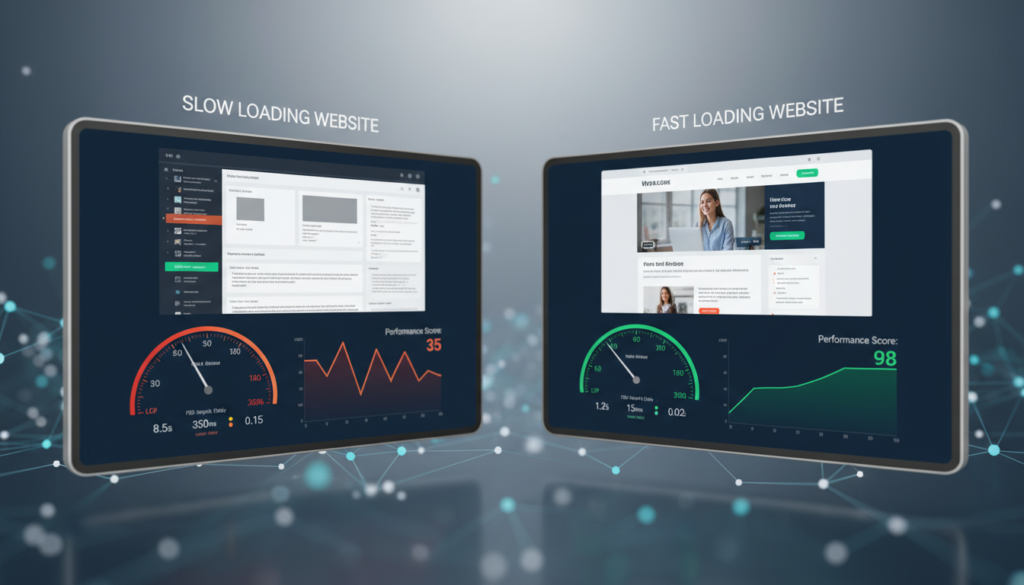
Performance optimization covers server tuning, caching, asset optimization, and CDN use to improve user experience and search visibility. Faster, more responsive pages reduce frustration and lower bounce rates while improving Core Web Vitals, signals search engines use in ranking. The benefit is measurable: optimized sites load quicker, interact more smoothly, and keep users engaged, driving higher conversion potential and better SEO outcomes. Below we review the main techniques and how they affect specific performance metrics and user behavior.
Research underscores the link between speed and user behavior, fast sites retain visitors and drive better business results.
Web Performance Tooling and Core Web Vitals: Why Speed Matters Users expect instant experiences. Studies show roughly half of visitors will abandon a page that takes more than three seconds to load, so measuring and improving speed is critical. Tools like Lighthouse, PageSpeed Insights, and WebPageTest help teams track Core Web Vitals, metrics such as Largest Contentful Paint (LCP) and First Input Delay (FID), and target the biggest wins. Small improvements in LCP, CLS, and interaction latency can noticeably boost engagement, conversion, and time on site. For practical optimization, combine tooling with incremental fixes and real-user testing.
| Technique | Targeted Metric | Typical Benefit |
|---|---|---|
| Caching (server & CDN) | LCP (Largest Contentful Paint) | Faster initial render and reduced server load |
| Image optimization & responsive assets | LCP / CLS (Cumulative Layout Shift) | Smaller payloads and more stable layouts |
| Code splitting & deferred scripts | FID / INP (interaction latency) | Improved responsiveness for user interactions |
| Compression & HTTP/2 or HTTP/3 | LCP and overall load time | Lower transfer sizes and faster network round-trips |
This table ties common optimization approaches to measurable metrics so teams can prioritize work that moves the needle.
Common techniques include strategic caching, modern responsive image formats, lazy loading, minimizing render-blocking resources, and using a CDN to deliver static assets closer to users. Server-side work, efficient database queries and compressed responses, reduces time to first byte, while front-end measures like critical CSS inlining and deferred JavaScript speed up rendering. The goal is simple: reduce the amount of work and data needed to show the most important content and make interactions feel instant. Implement changes incrementally, measure results, and iterate to preserve compatibility across devices.
These optimizations improve both measured metrics and perceived speed, which typically increases engagement and conversions.
Performance affects search rankings and conversions because search engines factor user experience into ranking algorithms, and visitors convert more on fast, responsive sites. Better Core Web Vitals reduce load friction and increase the chance users complete conversion paths. From a business view, even modest speed gains can translate into measurable lifts in engagement and revenue. Treat performance work as ongoing maintenance tied to KPIs like bounce rate, session duration, and conversion rate rather than a one-time project.
In short: performance is a strategic investment that protects organic traffic and amplifies other marketing and UX efforts.
Performance improvements are especially important for e-commerce sites, where every second affects sales and ad eligibility.
Core Web Vitals and E‑commerce: The Real Impact E-commerce sites that fall behind on speed and reliability see lower engagement and fewer conversions. Case studies show that neglected features and outdated code can erode user trust and reduce sales, and in some cases, affect advertising eligibility. Analyzing code quality, third‑party scripts, content, and architecture with Core Web Vitals in mind reveals clear paths to improvement that restore performance and buyer confidence.

Best practices for CMS maintenance focus on staged deployments, compatibility testing, curated plugin management, and rollback readiness to avoid update-related outages and security gaps. The process is straightforward: validate updates in staging, test critical user journeys, and schedule production pushes with rollback plans and monitoring. This reduces the risk of plugin conflicts, theme breakage, and unexpected downtime that hurt user experience and search visibility. Adding version control, deployment checklists, and automated tests where possible further lowers human error and speeds recovery if something goes wrong.
The sections that follow explain how these practices apply to WordPress and Shopify and how they reduce exposure from outdated components.
Regular updates for WordPress and Shopify bring new features, security hardening, and better compatibility with third‑party extensions. WordPress core and plugin updates often include performance and security fixes; Shopify theme and app updates keep payments and storefront features working smoothly. Staying current prevents the pain of large deferred updates and avoids sudden incompatibilities. Always test updates in staging before applying them to production to protect commerce flows and critical user journeys.
A predictable update cadence balances benefits from new functionality with the controlled risk needed for stable operations.
CMS maintenance reduces security risk by narrowing the window attackers can exploit known vulnerabilities and removing outdated components that are common attack vectors. Timely patches close security holes, while strict access controls and least‑privilege administration limit damage from compromised accounts. Practices like maintaining a plugin inventory and running automated dependency scans help identify risky extensions so you can retire or replace them. When these measures are part of a repeatable maintenance cycle, testing, backups, and monitoring, they greatly simplify incident response.
These controls work best when embedded in a regular cadence that includes testing and verification.
Open-source CMS platforms offer flexibility but also rely on community updates, which means staying current is a key part of security.
Open‑Source CMS Security: Risks and Best Practices Open‑source platforms benefit from community development, but that model can expose vulnerabilities if components are not kept up to date. Evaluating risk, applying timely updates, and following hardening best practices reduce the chance of exploitation.

Reliable backup and disaster recovery combine frequent, verifiable backups with documented recovery steps and regular testing to minimize downtime and data loss. The rule is simple: keep recent snapshots, verify they’re restorable, and rehearse restores so you can meet recovery objectives when incidents happen. Recovery planning also defines roles, communication steps, and escalation paths so technical and business teams can coordinate during an incident. With those pieces in place, teams can set realistic RTOs and RPOs based on business risk and tolerance. The checklist below gives a repeatable playbook for restoring service after common failures.
Use this step-by-step checklist and adapt it to your site’s complexity and priorities.
Rehearsing this lifecycle reduces confusion and speeds restoration during real incidents.
Backups and database upkeep are typically automated: scheduled snapshots, offsite retention, integrity checks, and routine database tasks like index tuning and log rotation. The core idea is redundancy plus verification, you keep multiple copies in separate locations and test restores to confirm recoverability. Database optimization trims bloat and improves query performance, which also shrinks backup sizes and speeds restores. Consistent routines make recovery predictable and lower the operational cost of restores.
When these tasks run on a schedule, restores complete within expected windows and outages are short.
Effective disaster recovery starts with a written plan that assigns roles, defines recovery objectives (RTO/RPO), maps dependencies, and lays out communication protocols. Follow the prepare → detect → respond → recover → learn model, with clear responsibilities and success criteria for each step. Regular drills and post‑incident reviews validate the plan and uncover improvements, while current contact lists and runbooks reduce confusion during a real event. A practiced recovery plan shortens downtime and limits secondary damage from unclear responsibilities.
Combining technical readiness with disciplined communication ensures recovery is fast, coordinated, and continuously improving.

Maintenance plans usually scale from Basic to Standard to Premium, with custom plans available to mix services for specific needs. Tiers increase coverage for security, backups, response time, and reporting. Choice depends on site complexity, traffic, and commercial risk, for example, e-commerce sites need tighter backup cadences and payment monitoring than brochure sites. Transparent comparisons help match budget to risk. The table below outlines common plan tiers and trade‑offs to guide initial conversations with a provider.
| Plan Tier | Core Coverage | Typical Value |
|---|---|---|
| Basic | Essential updates, weekly backups, basic uptime monitoring | Cost‑effective protection for informational sites |
| Standard | Faster response, performance tweaks, monthly reports | Balanced coverage for growing businesses |
| Premium | Priority support, advanced security, daily backups, performance SLAs | Comprehensive coverage for revenue‑critical sites |
Use this as a starting point, then add custom services for commerce, integrations, or compliance needs.
Packages typically grow in capability: Basic covers critical updates, backups, and basic monitoring; Standard adds faster response times, performance work, and monthly reporting; Premium includes priority support, advanced security, daily backups, and tailored SLAs. Higher tiers reflect lower tolerance for disruption and stronger remediation guarantees. Choose the package that matches your downtime risk, regulatory needs, and the financial impact of outages. Clear, comparable descriptions make procurement and governance easier.
After picking a baseline plan, many teams add customizations for platform specifics like e-commerce monitoring or API integrations.
Sites N Apps tailors maintenance plans within our Launch & Support workflow, offering flexible support aligned with business goals. We emphasize collaboration, careful QA, modern tooling, and flexible payment options including zero‑interest financing for eligible projects. If you want a partner that links development, SEO, and ongoing maintenance into a single lifecycle, we provide practical plan customization and consultative planning from our Lafayette, LA base.
Custom plans start with a discovery audit to inventory assets, third‑party integrations, traffic patterns, and revenue‑critical pages. The audit informs an SLA and feature priorities. Typical steps are: audit → proposal → SLA definition → implementation. From there you can set response windows, backup cadences, and monitoring thresholds for e‑commerce, SaaS, or content platforms. Common add‑ons include payment gateway monitoring, inventory sync checks, and focused performance work for conversion pages. A tailored plan ensures maintenance matches business risk and resources instead of forcing a one‑size solution.
Custom plans work best when tied to measurable KPIs and regular review cycles so coverage evolves as the site does.
This guidance helps teams make informed choices when negotiating maintenance services that protect user experience and revenue.
Common signs include slow load times, broken links, outdated content, and security alerts. Increased user complaints or recurring downtime are red flags. Drops in search rankings or vulnerability notifications are also signals that maintenance is overdue.
Frequency depends on site size, content volume, and business risk. A baseline is monthly checks, with more frequent attention for high‑traffic or e‑commerce sites. Apply critical security patches as soon as they’re available.
If you have the technical skills and time, you can manage basic updates and content. For security monitoring, performance tuning, or disaster recovery, a professional is recommended, especially for crucial revenue sites. Pros bring tools and processes that reduce risk and save time.
Neglect can lead to security breaches, slower performance, and falling search rankings. That translates to lost traffic, damaged reputation, and lower conversions. Regular maintenance reduces these risks and keeps the site working for users and the business.
Track uptime, page load speed, and user engagement with tools like Google Analytics and uptime monitors. Monitor search rankings and conversion rates to see business impact. Regular reviews of these metrics help you refine your maintenance plan.
Look for experience, a clear service list, and responsive support. Good providers offer security monitoring, backups, performance optimization, and content management with transparent SLAs and reporting. Client case studies and timely support are strong indicators of reliability.
Reliable website maintenance and ongoing support are essential to keep your site secure, fast, and positioned for growth. Prioritize regular updates, verified backups, and continuous performance work to protect user experience and search visibility. Choose a maintenance plan that fits your risk profile and business goals, and review it regularly as your site evolves. Learn how our tailored support options can help your business thrive, explore our services to find the right fit.




