

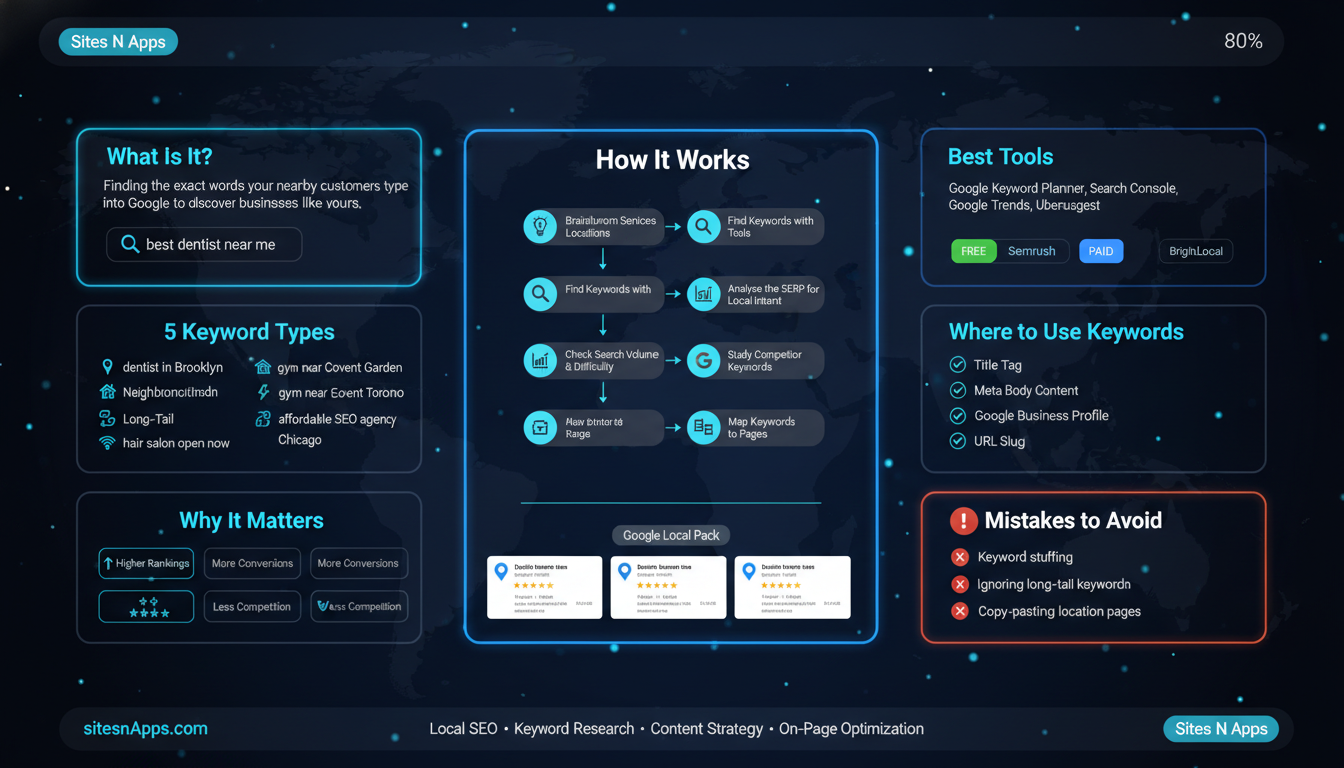
If you run a local business and you want people nearby to find you on Google, you need local keyword research. It is the very first step to getting your business to show up when someone searches for the products or services you offer in your area.
In this guide, we will walk you through everything you need to know: what local keyword research is, why it matters, what types of local keywords exist, which tools to use, and exactly how to do it step by step. By the end, you will have a clear plan to find the right keywords and use them to grow your local visibility online.
Local keyword research is the process of finding the specific words and phrases that people in a particular location type into Google when they are looking for a business, product, or service near them.

For example, when someone types “best pizza near me” or “plumber in Lafayette”, those are local search queries. Your job as a business owner is to make sure your website shows up for those searches, and that starts with knowing which keywords your potential customers are actually using.
Think of it this way: regular keyword research is like fishing in a big ocean. Local keyword research is like fishing in the lake right in your neighbourhood. The competition is smaller, the customers are closer, and your chances of making a catch are much higher.
Not all local keywords look the same. There are two main types based on how location is expressed:
Explicit local keyword. These include a location directly in the search phrase. Examples:
• “dentist in Chittagong”
• “SEO agency Lafayette United States”
• “best restaurant in Old Lafayette”
Implicit local keywords. These do not mention a location, but Google still treats them as local searches because the user’s intent is clearly local. Examples:
• “pizza near me”
• “Emergency plumber open now”
• “Hair salon open today”
Both types are important for your local SEO strategy. Many businesses only focus on explicit keywords and miss out on a huge number of searches that are also meant to find local results.
When someone searches for “how to fix a leaking pipe”, they want information. But when someone searches “plumber near me”, they want to hire someone right now. That is the key difference: local search intent is usually commercial or transactional. The person is ready to act, whether that means calling a business, visiting a store, or making a booking.
This is why local keyword research is so powerful. You are not just getting traffic, you are getting visitors who are ready to become customers.
You might be thinking: “I already have a website. Why do I need to do keyword research?” Here is the honest answer: having a website is not enough. If your website is not optimised for the right local keywords, Google has no idea who your target customers are or where you are located.

Here are the main reasons why local keyword research matters for any local business:
When someone does a local search on Google, they often see a special section at the top of the results called the Google Local Pack, those three business listings that show up on a map. Getting into the local pack means massive visibility for your business.
The keywords people search for directly influence which businesses appear in the local pack. If you optimise your website and Google Business Profile for the right local keywords, your chances of appearing in this prime spot increase significantly. If you are not sure where to start, Sites N Apps’ SEO Optimization service covers everything from keyword strategy to full on-page implementation.
Studies show that a large percentage of people who do a local search on their smartphone visit a business within 24 hours. That tells you something important: local search traffic converts at a much higher rate than regular traffic.
When someone searches “web design agency near me”, they are not just browsing. They want to hire someone. Targeting those keywords means you are putting your business in front of people at exactly the right moment.
Trying to rank for “web design agency” globally means competing with thousands of established companies worldwide. But ranking for “web design agency Lafayette” or “affordable web design in United States” means you are only competing with local businesses, and that is a much more winnable battle.
Local keywords generally have lower competition and higher relevance to your specific audience. That combination is a goldmine for small and medium-sized businesses.
Before you start researching keywords, it helps to understand the different categories. Each type serves a different purpose, and the best strategy uses a mix of all of them.

These are the most straightforward local keywords. They combine what your business does with a specific location. Examples:
• “digital marketing agency Lafayette”
• “best bakery in New Work”
• “car repair service Louisiana”
These are high-intent keywords because the person knows what they want and where they want it.
Sometimes people search for businesses in their specific neighbourhood or area, not just their city. These hyper-local keywords can be very valuable because they show even stronger local intent.
• “coffee shop in California”
• “gym near Alaska”
• “grocery store Arizona”
If your business is in a specific part of a city, these keywords can bring in highly relevant local traffic.
These are useful for businesses that travel to customers rather than having people come to them, like plumbers, electricians, delivery services, or cleaning companies. Examples:
• “AC repair service NYC”
• “home cleaning service delivery London”
• “plumbing service available in Heights”
Long-tail keywords are longer, more specific phrases. They usually have lower search volume, but the people searching for them are very specific about what they want, which means they convert better.
• “affordable web design agency for small business in Lafayette”
• “best dentist for children in Chittagong with weekend appointments”
• “emergency 24-hour plumber near me open on Friday”
These keywords are often ignored by competitors, which makes them easier to rank for. Do not overlook them.
These are searches where Google fills in the location based on the user’s GPS or IP address. You cannot always optimise directly for “near me” phrasing, but making sure your location signals are strong across your website and Google Business Profile will help you show up for these searches.
Now, let us get into the actual process. This is the part that makes the difference between a website that sits quietly online and one that brings in real local customers every day.

Start simple. Grab a piece of paper or open a spreadsheet, and write down:
1. What do you offer? List all your services or products. Be specific. Not just “cleaning” but “home cleaning”, “office cleaning”, “deep cleaning”, “carpet cleaning”.
2. Where do you serve? List every city, area, neighbourhood, or region you want to target. Include your main city, nearby areas, and specific neighbourhoods.
3. How would your customers describe you? Think like your customer. What words would they use to search? Sometimes customers use different words than business owners do.
Combine these elements together. For example, if you run an SEO agency in Lafayette, your initial seed keywords might be:
• “SEO agency Lafayette”
• “digital marketing company United States”
• “SEO services Lafayette”
• “local SEO Lafayette”
This brainstorm gives you your starting point, the seed keywords you will expand in the next steps.
Once you have your seed keywords, it is time to expand them using keyword research tools. These tools show you related keywords, their search volumes, and how hard it is to rank for them.
Here is what to do with each tool:
Google Autocomplete: Type your seed keyword into Google and look at what Google suggests as you type. These are real searches people make. For example, typing “web design” might show suggestions like “web design agencyLafayette”, “web design price United States”, “web design for small business”.
Google’s “People Also Ask”: Scroll down the Google search results page and look at the “People Also Ask” box. These are real questions your potential customers are asking, and they make excellent content ideas and keyword targets.
Related Searches: Scroll to the very bottom of Google’s search results page. You will see a list of “Related searches”; these are keyword gold.
Keyword Research Tools: Use tools like Google Keyword Planner (free), Ahrefs, Semrush, or KWFinder to get search volume data, keyword difficulty scores, and hundreds of keyword variations.
Pro Tip from Sites N Apps: When using keyword tools, always filter by location. Set the country to Bangladesh or the specific city you are targeting. National search data can be misleading for local keyword research.
Not all keywords are worth targeting. Here is how to judge which ones are worth your time:
• Search Volume: This tells you how many times a keyword is searched per month. For local keywords, do not expect huge numbers; a keyword with 100 monthly searches in your city can still send you valuable customers.
• Keyword Difficulty (KD): This score (usually from 0–100) tells you how hard it is to rank for a keyword. For local SEO, even keywords with a medium difficulty score can be winnable if your competitors are small local businesses.
• Local Intent Score: Ask yourself: would someone searching this keyword be looking for a local business? If yes, it is worth targeting.
• Commercial Intent: Keywords that suggest the person is ready to buy or hire (like “near me”, “hire”, “service”, “price”, “cost”) are more valuable than purely informational keywords.
SERP analysis means looking at the actual search results for your target keyword to understand what Google thinks the searcher wants.
Go to Google and search for your keyword. Look at:
1. Does the local pack appear? If you see a map with 3 business listings, that keyword has strong local intent. This means ranking your Google Business Profile matters just as much as ranking your website.
2. Who is ranking? Are the top results local businesses, or are they big national websites and directories? If local businesses rank at the top, that is a green light; you can compete.
3. What type of pages rank? Are they service pages, blog posts, home pages, or directory listings? This tells you what type of content you should create for that keyword.
4. How strong are the competitors? Check how many backlinks and reviews the top-ranking businesses have. If they are small local businesses with few reviews, you have a real shot at outranking them.
Your competitors have already done some of the work for you. By seeing which keywords they rank for, you can find valuable opportunities you might have missed.
Here is how to do it:
1. Identify 3 to 5 local competitors’ businesses similar to yours in your area that already rank well on Google.
2. Enter their website URL into a tool like Ahrefs, Semrush, or Ubersuggest.
3. Look at the list of keywords they rank for. Pay attention to local keywords with decent search volume.
4. Look for “keyword gaps”, keywords your competitors rank for but you do not. These are ready-made opportunities.
Sites N Apps Tip: Look for keywords where your competitors rank between positions 5 and 20. These are keywords where ranking is clearly possible, and with better content and optimisation, you can move to the top 3.
Once you have your keyword list, you need to decide which page on your website will target which keyword. This is called keyword mapping, and it prevents something called keyword cannibalisation, where two pages on your site compete with each other for the same keyword.
The basic rule is simple: one primary keyword per page. Here is an example mapping:
• “web design agency Lafayette”, Home page or main services page
• “SEO services Lafayette”, Dedicated SEO services page
• “social media marketing United States”, Social media services page
• “What is local SEO?”, A blog post answering that question
You do not need to spend a lot of money to do good local keyword research. Here is a breakdown of the best free and paid tools available:

Google Keyword Planner, Google’s own tool, gives you search volume ranges and keyword ideas. It is free with a Google Ads account and allows you to filter by country and city.
Google Search Console: If your website is already live, Search Console shows you which queries people are already using to find your site. This is incredibly valuable for finding low-hanging fruit.
Google Trends: Use the location filter to see which search terms are trending in your specific city or region. Great for spotting seasonal patterns.
Google Autocomplete and Related Searches: Simple but powerful. Always check both before moving to paid tools.
Ubersuggest (Free Version) gives you keyword ideas, volume estimates, and SEO difficulty scores with a generous free tier.
Ahrefs is one of the most powerful SEO tools available. Excellent for competitor keyword analysis, finding keyword gaps, and tracking rankings.
Semrush Great all-in-one tool with strong local SEO features, including a dedicated local SEO toolkit. Very useful for tracking your position in the local pack.
KWFinder by Mangools A user-friendly keyword research tool with accurate difficulty scores. Good for beginners.
BrightLocal is built specifically for local SEO. Excellent for tracking local rankings, managing citations, and monitoring reviews.
This is an often-overlooked goldmine. Inside your Google Business Profile dashboard, the “Insights” section shows you exactly what search terms people are using to find your business listing. These are real, actual keywords your local audience is searching for; use them!
Finding the right keywords is only half the battle. Now you need to use them in the right places so Google understands what your pages are about and who they are for.
If you serve multiple locations, create a dedicated landing page for each one. Each page should:
1. Target one primary local keyword (e.g., “SEO services New York”)
2. Include the location name naturally throughout the text
3. Have unique, useful content; do not just copy-paste the same page for every city and change the name
4. Include your address, phone number, and a Google Map embed for that location
5. Feature local customer reviews and testimonials if possible
Once you know your target keyword, place it in these key spots on the page:
• Title Tag: This is the most important place. Include your keyword naturally. Example: “Affordable SEO Services in Lafayette | Sites N Apps”
• Meta Description: Write a short, compelling description that includes your keyword and a reason to click.
• H1 Heading: Your main heading should include the primary keyword.
• Body Content: Use the keyword naturally throughout the text. Do not stuff it; use it where it sounds natural, and use related terms and LSI keywords around it.
• Image Alt Text: Include location or service descriptors in the alt text of your images.
• URL Slug: Keep it clean and keyword-rich. Example: /seo-services-Lafayette
Your Google Business Profile (GBP) is your most powerful local SEO asset. Here is how to optimise it with your local keywords:
• Business Name and Category: Make sure your category accurately describes your business. Google uses this to match you to local searches.
• Business Description: Write a natural, keyword-rich description of what you do and where you serve. Include your primary local keyword and 2 to 3 secondary keywords.
• Services and Products: Use keyword-rich names for your services listed in GBP.
• Google Posts: Regularly post updates, offers, and news. Use local keywords naturally in these posts.
• Reviews: Encourage happy customers to leave reviews and mention the service they used. Reviews that naturally contain your keywords can help with local rankings.
NAP stands for Name, Address, and Phone Number. Make sure your NAP information is exactly the same everywhere it appears online, your website, Google Business Profile, Facebook, directories, and any other listings. Even small inconsistencies (like “Rd” vs “Road”) can confuse Google and hurt your local rankings.
Adding Local Business Schema Markup to your website is also a smart move. This is a small piece of code that directly tells Google your business name, address, phone number, opening hours, and service area. It makes it easier for Google to show your information accurately in search results.
If your business serves multiple cities or has multiple branches, handling local keyword research gets a bit more complex, but the approach is straightforward.
Here is the model to follow:
1. Create a separate page for each location. Do not try to rank one page for multiple cities. Google wants to send searchers to the most relevant local result, and a page dedicated to each city will perform much better.
2. Do location-specific keyword research for each area. People in different cities may use slightly different terms. Do not assume the same keywords apply everywhere.
3. Create a Google Business Profile for each physical location. Each branch should have its own listing, fully optimized for that location’s keywords.
4. Write unique content for each location page. Mention landmarks, local events, or local customer stories. This signals to Google that the page is genuinely about that location, not just a template with the city name swapped out.
5. Use a clear URL structure. Something like /locations/Lafayette or /Lafayette-seo-services keeps things organised and keyword-friendly.
Doing local keyword research and optimising your pages is great, but you need to actually measure whether it is working. Here is how to track your local search performance.
Use Google Search Console (free) to see which keywords your website is appearing for and what position you are ranking in. You can filter by country and see click-through rates for each keyword.
For more detailed tracking, tools like Semrush, Ahrefs, or SERPWatcher let you set specific location targets and track your ranking position over time for each keyword you care about.
Ranking in regular search results and ranking in the Google Maps local pack are two different things, and you need to track both.
Tools like BrightLocal, Whitespark, and LocalFalcon specialise in local rank tracking and show you how your business appears in the local pack for different keyword searches across different neighbourhoods and zip codes. This is especially useful if your service area is spread across a large city.
• Google Search Console: Free, reliable, and great for tracking organic rankings.
• BrightLocal: Best for tracking local pack rankings and managing your local presence.
• Semrush Position Tracking: Set your target location and track all your keywords in one place.
• LocalFalcon: Visual local rank tracking that shows your business’s visibility across a map grid. Very useful for understanding exactly where you rank in your service area.
Let us walk through a real-world example to make this concrete. Imagine you run a photography studio in Lafayette.
Step 1: Brainstorm
Services: portrait photography, wedding photography, newborn photography, and product photography.
Locations: Lafayette, Gulshan, Banani, Dhanmondi, Uttara.
Step 2: Build Seed Keywords
• “photography studio Lafayette”
• “wedding photographer Lafayette”
• “newborn photography Louisiana”
• “product photography service United States”
Step 3: Expand with Tools
Using Google Keyword Planner and Ahrefs, you discover additional keywords like:
• “best wedding photographer in Lafayette”
• “affordable portrait photography Louisiana”
• “professional product photography Lafayette price”
• “maternity photographer near me, Lafayette”
Step 4: Check SERP and Competition
Searching “wedding photographer Lafayette” on Google, you see the local pack appears with 3 studios listed. The organic results are mostly small local photography studios, not big national directories. This means competition is manageable.
Step 5: Keyword Mapping
• Home page targets: “photography studio Lafayette”
• Wedding page targets: “wedding photographer Lafayette”, “best wedding photographer in Lafayette”
• Product page targets: “product photography Lafayette”, “professional product photography United States”
• Newborn page targets: “newborn photography Lafayette”, “maternity photographer Lafayette”
With this keyword map in place, you now know exactly what to write on each page and how to optimise your Google Business Profile. That is local keyword research working in practice.
Even smart business owners make these mistakes. Avoid them, and you will be ahead of most of your local competitors.

• Only targeting broad city-level keywords: “SEO agency Lafayette” is great, but so is “SEO agency Louisiana” or “affordable SEO service Lafayette for small business”. Go beyond just the city name.
• Keyword stuffing: Cramming your keyword into every sentence does not help; it actually hurts your rankings and makes your content unreadable. Use keywords naturally.
• Ignoring long-tail keywords: These longer, specific phrases are often where the most valuable customers are hiding. Do not skip them because the search volume looks small.
• Skipping competitor research: Your competitors’ keyword lists are free research. Do not ignore them.
• Not tracking results: If you do not track your rankings, you will not know what is working and what needs fixing.
• Forgetting your Google Business Profile: Many businesses invest heavily in their website but neglect their GBP. This is a big missed opportunity for local visibility.
• Using the same page for every location: Thin, copy-pasted location pages with only the city name changed are a red flag for Google. Create genuinely useful, unique pages for each location.
Local keyword research is not a one-time task; it is the foundation of your entire local SEO strategy. When you know exactly what your customers are searching for and where they are searching from, you can create content and optimise your website to meet them at exactly the right moment.
To recap what we covered:
• Local keyword research finds the search terms your nearby customers actually use
• There are multiple types of local keywords: geo-modified, hyper-local, service-area, long-tail, and implicit
• The step-by-step process goes from brainstorming to finding, evaluating, analysing SERPs, studying competitors, and mapping keywords
• Use a combination of free tools (Google Keyword Planner, Search Console) and paid tools (Ahrefs, Semrush, BrightLocal) for the best results
• Optimise your website pages, Google Business Profile, and maintain NAP consistency
• Track your rankings regularly to know what is working
At Sites N Apps, we help local businesses in United States and beyond with complete SEO strategies, from local keyword research to full on-page and off-page optimisation. If you want expert help finding the right keywords for your business and turning them into real rankings and real customers, get in touch with us today.
Contact Sites N Apps and let us do the local keyword research for your business so you can focus on what you do best.




