
Home / Blog Details
Take your digital marketing to the next level with data-driven strategies and innovative solutions. Let’s create something amazing together!

From Google search results to AI chatbots, we optimize your website so customers can find you faster — and choose you over competitors.
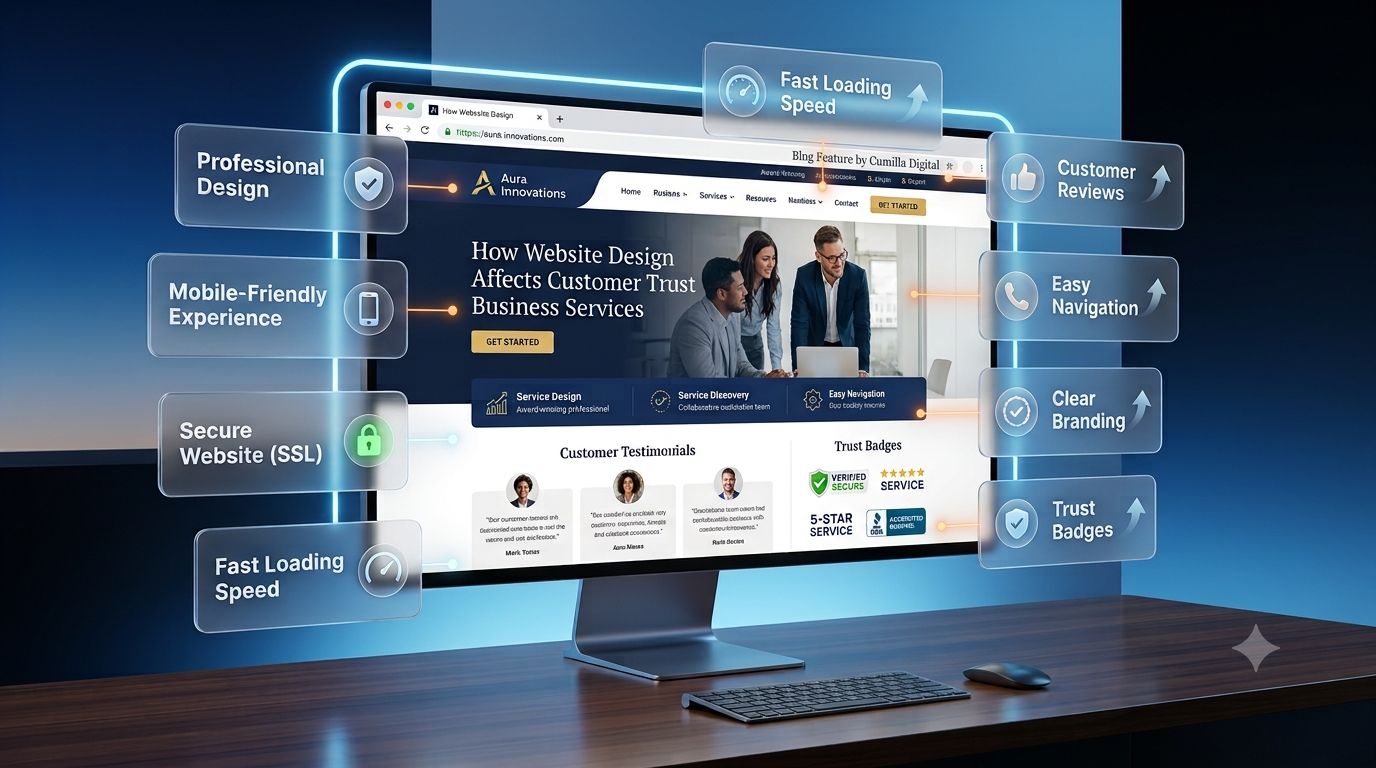
Website design affects customer trust because visitors judge a business within 50 milliseconds of landing on a page. Clean layouts, fast loading times, and clear navigation signal credibility. Cluttered pages, slow load speeds, and outdated visuals push buyers toward competitors. Trust built through design directly drives conversion rates and revenue.
Your website might be losing customers before they read a single word. A visitor lands on your homepage. Within seconds, they decide if your business feels trustworthy or forgettable. That decision happens long before they read your pricing or your service list.
This is not guesswork. Researchers at Stanford’s Persuasive Technology Lab studied thousands of website credibility judgments and found that most people evaluate a company based purely on how the site looks and functions (Source: Stanford Persuasive Technology Lab). At Sites N Apps, we have audited hundreds of small business sites across Lafayette, LA, and the pattern repeats every time. Weak design quietly drains conversions, even when the product or service is excellent.
This guide breaks down exactly how website design affects customer trust and buying decisions. You will learn what builds confidence, what destroys it, and which fixes move the needle fastest.
Design is not decoration. It is the first conversation your business has with a stranger. Before a visitor reads your value proposition, they have already reacted to your layout, colors, and spacing.
Credibility and conversions move together. A visitor who trusts your site is far more likely to fill out a form, call your business, or complete a purchase. When design feels unpolished, visitors assume the business behind it is unpolished too.
This assumption happens fast. Design quality acts as a proxy for business quality in the buyer’s mind, even when that connection is not fair. As a result, two businesses offering identical services can see very different conversion rates based on site design alone.
Most customers now research a business online before ever making contact. They compare websites the way they once compared storefronts. A clean, professional site suggests a reliable operation. A messy one raises doubt.
Customers scan for specific signals during this evaluation. They look at photos, checking whether images feel real or generic. They check for a phone number and address. They notice if the site feels current or dated. Each signal adds or subtracts trust points before a single word gets read.
No one buys from a business they do not trust, regardless of price or product quality. Trust removes the fear that stops a purchase. It answers the unspoken question every visitor asks: is this business safe to give my money and information to?
Without trust, even a strong offer fails to convert. This is why website design affects customer trust so directly. Design either builds that foundation or cracks it, section by section, as the visitor scrolls.
Trust does not build gradually on most websites. It forms almost instantly, then either strengthens or weakens as the visitor keeps browsing.
Research from Google found that users form visual impressions of a website in as little as 50 milliseconds (Source: Google, “The Role of Visual Complexity and Prototypicality,” 2012). That is faster than a blink. In that instant, visitors decide whether a site looks trustworthy, current, and professional.
This first impression sets the tone for everything that follows. A strong opening layout earns the visitor’s patience. A weak one earns an exit click. There is rarely a second chance to correct a bad first impression.
Consistent branding tells visitors a business pays attention to detail. Matching fonts, colors, and logo placement across every page creates a sense of order. Inconsistent branding does the opposite. It signals that no one is minding the store.
Small businesses often skip this step because it feels cosmetic. However, visual consistency is one of the fastest, cheapest ways to raise perceived professionalism. A visitor cannot verify your business license in ten seconds, but they can spot mismatched fonts instantly.
An outdated website silently tells visitors the business itself may be outdated. Old templates, tiny text, and dated stock photos read as red flags, even for genuinely reliable companies. Visitors connect visual age with operational age, fairly or not.
Modern design does not require flashy animation or trendy gimmicks. It requires clean spacing, current typography, and layouts that feel intentional. A refreshed design often changes buyer perception more than any change to the actual service offering.
Trust is built through specific, controllable design choices. Each element below plays a distinct role in how confident a visitor feels.
Visitors should never wonder where to click next. Clear navigation reduces friction and keeps visitors moving toward a decision instead of getting lost. A confusing menu structure makes even a great business feel disorganized.
Good navigation follows a simple rule: important pages, like services and contact information, belong within one or two clicks of the homepage. Burying key pages under multiple menu layers frustrates visitors and increases bounce rate.
Most local searches now happen on a phone, not a desktop. A site that looks great on a laptop but breaks on mobile loses a large share of potential customers immediately. Responsive design adjusts layout, text size, and buttons automatically for any screen.
Mobile frustration compounds quickly. Tiny buttons, sideways scrolling, and slow-loading images push visitors to hit the back button within seconds. Mobile-friendly design is no longer a nice extra. It is a baseline requirement for trust.
Speed is a trust signal, whether visitors realize it consciously or not. According to Google’s research, 53 percent of mobile visitors abandon a page that takes longer than 3 seconds to load (Source: Think with Google, 2018). Every extra second raises the chance of losing that visitor entirely.
Core Web Vitals, Google’s set of page experience metrics, measure loading speed, visual stability, and interactivity. Sites that score well on these metrics tend to keep visitors longer and convert them more often. Slow, laggy pages feel unreliable, and unreliable feels untrustworthy.
Text that is hard to read creates instant friction. Small font sizes, low contrast colors, and dense paragraphs all raise the mental effort required to understand your offer. Visitors rarely fight through difficult text. They simply leave.
Readable typography uses adequate font size, generous line spacing, and strong contrast between text and background. Short paragraphs and clear headings help visitors scan content quickly, which matches how most people actually browse the web.
Blurry, stretched, or obviously generic stock photos undercut credibility fast. Visitors associate image quality with business quality, similar to how they judge overall design. Real photos of your team, location, or completed work build far more trust than stock imagery ever can.
Consistency matters here too. Images with mismatched lighting, style, or aspect ratios create a disjointed feel across the site. A cohesive visual style, even with simple photography, reads as more professional than expensive but inconsistent imagery.
Accessible design ensures visitors with disabilities can navigate, read, and interact with your site. This includes proper color contrast, alt text for images, and keyboard-friendly navigation. Beyond legal considerations, accessibility widens your potential customer base.
The Web Content Accessibility Guidelines from the World Wide Web Consortium outline specific standards businesses can follow. A site built with accessibility in mind often performs better for every visitor, not just those with disabilities, because it forces clearer structure and simpler navigation.
Buying decisions are not purely rational. Psychology shapes how visitors process a website and decide whether to act.
Every choice a visitor makes on your site costs mental energy. Too many options, too much text, or too many competing calls to action create cognitive load. When that load gets too high, visitors often choose the easiest option: leaving.
Reducing choices at each step helps visitors move forward instead of stalling. A service page with one clear next step converts better than a page offering five different paths with no obvious priority.
Hick’s Law states that the time it takes to make a decision increases with the number of choices presented. A simplified menu or a single primary call to action speeds up decisions and reduces hesitation.
Fitts’s Law explains that larger, closer targets are easier and faster to interact with. This is why prominent, well-placed buttons convert better than small links buried in text. Both principles support the same idea: simpler, clearer design speeds up buying decisions.
Visual hierarchy guides the eye toward what matters most first. Size, color, and placement all signal importance. Without hierarchy, every element competes for attention, and visitors struggle to know where to focus.
Strong headlines act as signposts, helping visitors decide whether to keep reading. Clear, benefit-focused headlines outperform vague or clever ones because they answer the visitor’s core question immediately: what is in this for me?
White space is not wasted space. It gives content room to breathe and helps visitors process information without feeling overwhelmed. Cramped layouts with no breathing room increase cognitive load and reduce comprehension.
Color influences emotional response before visitors consciously register why. Blues often read as trustworthy and calm, which explains their popularity with financial and healthcare brands. Reds can signal urgency, while greens often suggest growth or safety.
There is no universal best color for trust. What matters most is consistency and contrast that supports readability. A well-chosen palette reinforces brand personality without distracting from the core message.
Emotional design shapes how visitors feel about a business, not just what they think about it. A site that feels warm, professional, or dependable creates an emotional shortcut toward trust. This shortcut often influences buying decisions more than logical comparison.
Photography, tone of voice, and micro-interactions all contribute to this emotional layer. Businesses that invest in this feel, not just function, often see stronger brand loyalty over time.
Specific design elements exist purely to reassure hesitant buyers. These trust signals answer objections before visitors have to ask.
Social proof reduces perceived risk by showing that other customers had a good experience. Reviews, star ratings, and testimonials placed near calls to action can directly increase conversion rates. Visitors trust other customers more than they trust marketing copy.
Placement matters as much as content. Reviews buried on a separate page get far less impact than reviews shown alongside relevant services or products.
Case studies go beyond a short quote by showing measurable results. They demonstrate real outcomes for real clients, which builds credibility for businesses making bigger claims. A detailed before-and-after story often persuades skeptical buyers more effectively than general praise.
For service businesses, a short case study on a service page can turn a hesitant visitor into a lead by proving the process actually works.
Security signals matter most at the point of purchase. An SSL certificate, shown as a padlock icon in the browser, confirms that data passed between the visitor and the site stays encrypted. Sites without this signal often trigger browser warnings that scare visitors away instantly.
Trust badges from payment processors, like recognized card logos, reinforce the same message. Visitors want visible proof that their financial information stays protected.
A visible phone number, physical address, and email build confidence that a real business stands behind the website. Hidden or missing contact details raise suspicion, especially for visitors unfamiliar with the brand.
Transparency extends to policies as well. Businesses that clearly explain how they operate tend to earn more trust than those that leave visitors guessing.
Clear guarantees remove risk from the buyer’s side. A visible return or refund policy tells visitors that the business stands behind its product or service. Vague or hidden policies create hesitation right at the moment of decision.
Specificity matters here. A guarantee with clear terms performs better than a vague promise of satisfaction, because it feels concrete and enforceable.
Certifications and awards act as third-party validation. They tell visitors that outside organizations have already vetted the business, which reduces the burden of proof on the visitor. Recognizable partner logos work the same way, borrowing trust from established brands.
These signals work best when placed near the decision point, not buried on an about page visitors rarely reach.
Trust alone does not guarantee a sale. Design also needs to guide visitors smoothly toward the buying decision itself.
A value proposition answers one question fast: why should a visitor choose this business over alternatives? This message belongs near the top of the homepage, stated plainly rather than buried in clever language.
Vague value propositions force visitors to work harder than necessary. Specific, benefit-driven statements convert better because they immediately connect with what the visitor actually needs.
Service and product pages carry the heaviest conversion weight on most sites. Each page should answer what the offer includes, who it helps, and what happens next. Missing any of these elements creates unnecessary hesitation.
Strong pages also anticipate objections directly, addressing pricing concerns, timelines, or common misconceptions before the visitor has to search for answers elsewhere.
Hidden pricing creates friction, even when a custom quote is genuinely necessary. Whenever possible, showing starting prices or price ranges helps visitors self-qualify before contacting a business. This saves time for both sides.
When exact pricing is not possible, explaining what factors affect cost gives visitors a reasonable framework instead of total uncertainty.
Every extra form field reduces completion rates. Asking only for essential information speeds up the process and respects the visitor’s time. Long, complicated forms feel like a barrier, not an invitation.
The same principle applies to checkout flows. Fewer steps, clear progress indicators, and multiple payment options all reduce abandonment at the final stage of a purchase.
A call to action tells visitors exactly what to do next. Vague buttons like “submit” underperform specific ones like “get my free quote.” Placement matters too. CTAs should appear at natural decision points, not only at the very bottom of a page.
Repetition helps on longer pages. A visitor convinced halfway through a page should not have to scroll far to act on that decision.
Some design choices consistently damage trust, regardless of industry. Avoiding these mistakes prevents unnecessary conversion loss.
Slow sites frustrate visitors and signal neglect. Combined with a poor mobile experience, this mistake alone can eliminate a large share of potential customers before they see any content at all.
Overloaded pages with too many competing elements overwhelm visitors. Weak or inconsistent branding compounds the problem, making a business feel unprofessional even when the underlying service quality is strong.
Surprise fees or misleading claims destroy trust instantly, often permanently. Visitors who feel misled rarely give a business a second chance, and they frequently share that frustration with others.
Broken links, missing images, and error pages tell visitors that a site is not maintained. These small technical failures carry outsized damage because they suggest the business itself may be similarly neglected.
Trust is not a one-time achievement. It requires ongoing measurement and adjustment as visitor expectations evolve.
Conversion rate measures how many visitors take a desired action, while bounce rate tracks how many leave without engaging. Watching both metrics together reveals whether design changes are helping or hurting trust and performance.
Heatmaps show where visitors click, scroll, and hesitate. Session recordings reveal actual browsing behavior in detail. Together, these tools expose friction points that surveys or assumptions alone often miss.
Direct feedback fills gaps that analytics cannot explain. A short survey asking visitors what almost stopped them from converting often reveals design problems the business never noticed internally.
A/B testing compares two versions of a page to see which performs better. This removes guesswork from design decisions and replaces opinion with actual visitor behavior, one controlled change at a time.
Outdated information, old promotions, or inconsistent branding erode trust gradually. Regular content audits keep a site accurate and current, which protects the trust that good design originally built.
Website design and customer trust are directly connected, from the first 50 milliseconds of a visit through the final click on a checkout button. Fast loading speed, clear navigation, honest trust signals, and simplified paths to purchase all work together to turn visitors into customers. Ignoring any one of these elements creates friction that competitors are often happy to capture instead.
Most business owners do not need a complete rebuild to see improvement. Often, targeted fixes to speed, mobile experience, and trust signals produce measurable gains within weeks. At Sites N Apps, we have helped Lafayette, LA businesses identify exactly which design gaps are costing them customers, then fix them with a clear, prioritized plan.
If your site feels like it might be losing trust before visitors even reach your offer, we can help you find out for certain. Explore our website design services or visit Sites N Apps to request a free website audit. We will show you exactly where your design is helping, and where it is holding your business back.
Visitors form an initial trust judgment in about 50 milliseconds, according to research on visual complexity and website credibility. That first impression shapes how they interpret everything else on the page, including your offer and pricing.
Design affects sales directly. Visitors connect design quality with business quality, and that perception influences whether they call, fill out a form, or complete a purchase. Poor design creates friction that can override an otherwise strong offer.
Improving page load speed and mobile responsiveness usually delivers the fastest results. Both issues cause immediate visitor frustration, and fixing them often requires less time and cost than a full redesign.
Yes. Reviews and testimonials act as social proof, reassuring visitors that other customers had a good experience. Placing reviews near relevant services or calls to action tends to increase their impact on conversions.
Most businesses benefit from a design review every 2 to 3 years, with smaller content and image updates happening more often. Outdated visuals can quietly signal an outdated business, even when the company itself is current.
Yes. Targeted improvements, like clearer navigation, updated photos, visible contact information, and faster load times, often improve trust and conversions without the cost or downtime of a complete rebuild.
Struggling to compete for high-search-volume keywords? We help businesses like yours increase visibility, drive more traffic, and dominate competitive search terms—all while keeping your costs low. Our proven strategies focus on long-term growth and measurable results.