
Want your business to show up when people search on Google Maps? You are in the right place.
Every day, millions of people open Google and search for things like “pizza near me” or “plumber in Lafayette, LA.” Google then shows a small box with three local businesses. That box is called the Local Pack. Getting into that box can change your business.
But how does Google decide which three businesses to show?
It comes down to Google Maps ranking factors. These are the signals Google looks at to figure out which business is the best match for a search. In this guide, you will learn what those factors are and how to use them to rank higher.
Google Maps does not just show the closest business to you. It looks at many things at once to find the best match.
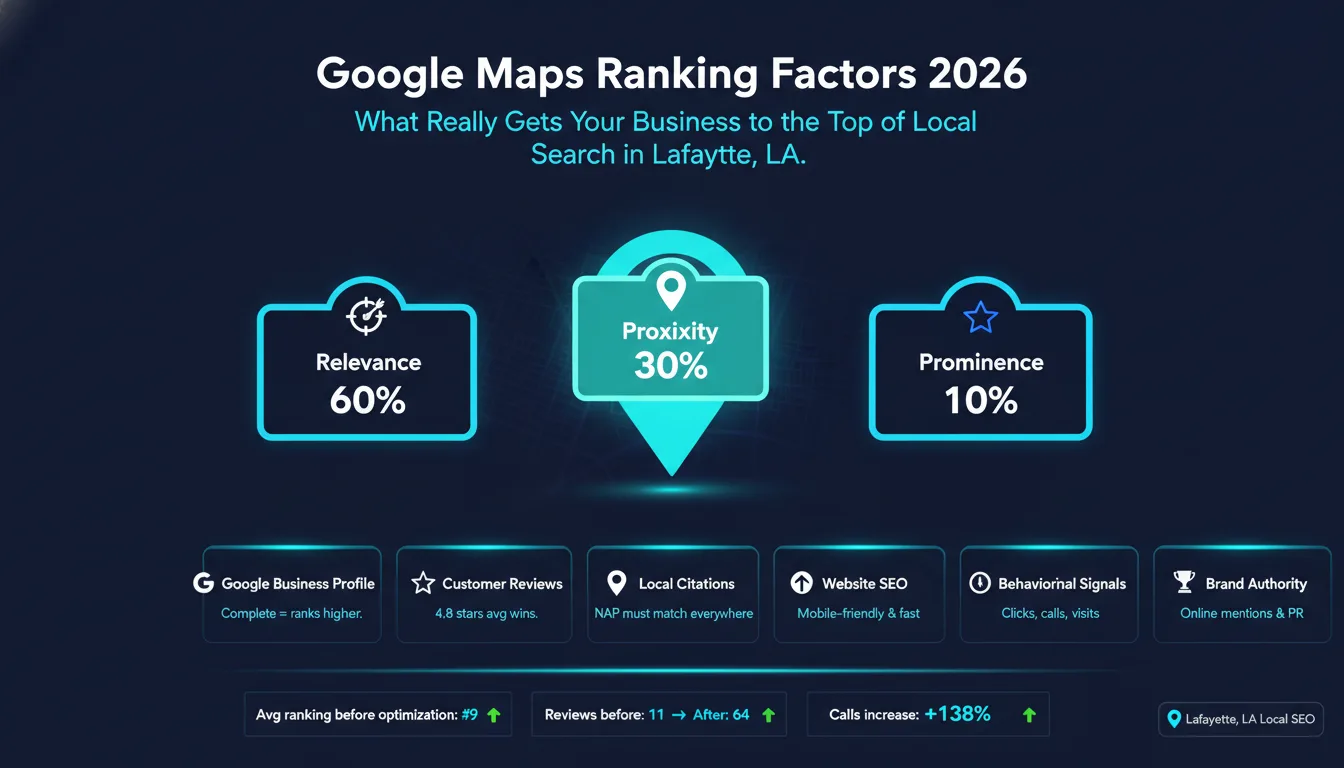
Google uses three core signals to rank businesses in local search.
Relevance means how well your business matches what someone is searching for. If someone searches “family dentist in Lafayette,” Google looks at your profile to see if you are actually a family dentist.
Distance means how far your business is from the person searching. Google calls this proximity. A business that is two blocks away has an advantage over one that is ten miles away.
Prominence means how well-known and trusted your business is. A business with hundreds of great reviews and a strong website will rank higher than one with no reviews and a blank profile.
When someone searches for a local business, Google runs through its algorithm in a split second. It looks at your Google Business Profile, your website, your reviews, and dozens of other signals. Then it picks the three businesses that score highest across all three signals.
Think of it like a three-legged stool. Relevance, distance, and prominence are the three legs. If one leg is weak, the stool falls over. You need all three to rank well.
In a city like Lafayette, LA, most searches happen on phones. Someone is driving around or sitting at a coffee shop, and they need something fast. They type “near me” and expect results in seconds.
This means proximity matters a lot here. But it also means your profile needs to be clean and complete. If your profile looks abandoned, Google will skip you even if you are right around the corner.
Service-area businesses like plumbers or cleaners work a bit differently. They do not have a storefront. Google looks at the service area you set in your profile and matches that to search locations.
Now let’s go deeper. Here is what each signal actually means and how much it matters.
Relevance is the biggest factor. It makes up roughly 60% of your ranking. Google wants to show businesses that actually match the search.
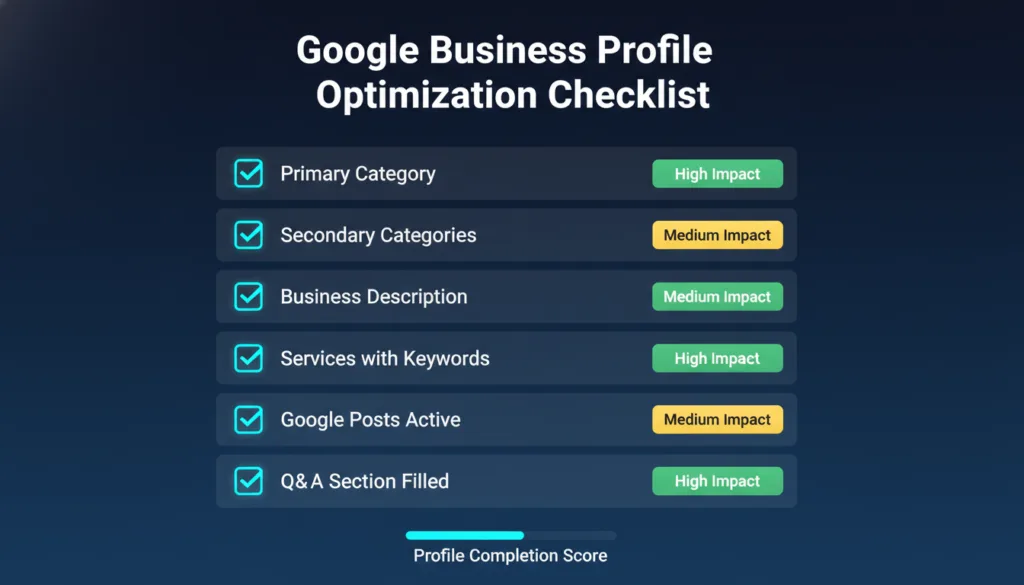
Your primary category is the most important field in your Google Business Profile. It tells Google exactly what you do.
If you are a tax accountant, your primary category should be “Tax Preparation Service,” not just “Accountant.” The more specific you are, the better Google understands you.
You can also add secondary categories. These help you show up for related searches. A pizza place might add “Italian Restaurant” and “Delivery Restaurant” as secondary categories.
A complete profile ranks better than an incomplete one. Fill in every field. Add your hours, phone number, website, and address. Write a full description. Add photos.
Google sees a complete profile as a sign that you are active and trustworthy. An empty profile sends the opposite signal.
Write your business description like you are talking to a customer. Use natural language. Include words that your customers actually type into Google.
For example, if you run a pest control company in Lafayette, your description might say: “We offer pest control services in Lafayette, LA. We handle ants, termites, roaches, and more.”
Do the same in your services section. List each service clearly. Add a short description to each one. This gives Google more text to read and understand.
The Q&A section is often ignored. But it is a free space to add more keywords. You can add your own questions and answer them. Think about what customers ask you most.
You cannot change where your business is located. But you can understand how proximity works, so you set expectations right.
If someone searches from across town, businesses closer to them will likely rank above you. That is just how distance works. But if you serve multiple areas, make sure your service area is set correctly in your profile.
For businesses with a physical location, proximity is calculated from your address. For service-area businesses, Google uses the area you define.
One thing that helps here is having a website with location-specific pages. If you serve three cities, having a separate page for each city gives Google more confidence in your coverage area.
Prominence is about authority. It is the signal that rewards businesses that have built real trust over time.
Reviews are one of the strongest prominence signals. Google looks at three things: how many reviews you have, what your average rating is, and how recent your reviews are.
A business with 200 reviews and a 4.6 rating will almost always outrank a business with 10 reviews and a 4.9 rating. Volume matters.
Recency matters too. A flood of reviews from three years ago is not as powerful as steady reviews coming in every week.
When other local websites link to yours, Google sees that as a vote of trust. A link from the Lafayette Chamber of Commerce, a local news site, or a community blog is worth a lot.
You do not need hundreds of backlinks. A handful of strong local links can move the needle more than dozens of low-quality ones.
NAP stands for Name, Address, and Phone Number. Google checks your NAP across the entire web. It looks at directories like Yelp, Yellow Pages, and local sites to make sure your information matches.
If your address is listed differently on different sites, Google gets confused. That confusion hurts your ranking.
When people click on your listing, call you, or ask for directions, Google notices. These actions tell Google that your listing is useful and relevant.
A listing that people ignore is a sign that it is not a good match. A listing that people engage with is a sign that it is exactly what they were looking for.
Your Google Business Profile is the single most important asset for local rankings. Here is how to get the most out of it.
Start with your primary category. Spend time on this. Look at what your top competitors are using. Then pick the category that best describes what you do.
Secondary categories should cover the other services you offer. But do not add categories that have nothing to do with your business. That can confuse Google.
Your description has a 750-character limit. Use it well.
Start with your most important service and location. Then mention other key services. End with a simple call to action or a statement about what makes you different.
Do not stuff keywords in. Write like a human. Read it out loud. If it sounds weird, rewrite it.
The services section lets you list everything you offer. Each service can have a name and a description.
Write each description with local keywords in mind. Instead of just saying “Lawn Care,” say “Lawn care services in Lafayette, LA, including mowing, edging, and fertilizing.”
This is free content that Google reads. Use it.
Businesses with photos get more clicks. It is that simple.
Add photos of your storefront, your team, your work, and your products. Use real photos, not stock images. Upload new photos regularly. This signals to Google that your profile is active.
Name your photos with descriptive file names before uploading. A file named “lafayette-plumber-bathroom-repair.jpg” gives Google more information than “IMG_4521.jpg.”
Google Posts are short updates that appear on your profile. They can include offers, events, updates, or new products.
Posting regularly keeps your profile fresh. Fresh profiles tend to rank better than stale ones. Aim for at least one post per week.
Google pays attention to how active your profile is. Businesses that post regularly, respond to reviews, and update their information tend to rank higher.
Think of your profile like a social media account. The more you engage with it, the more visible it becomes.
Respond to every review. Even a short “Thank you so much!” counts. Review response speed is a signal. The faster you respond, the better.
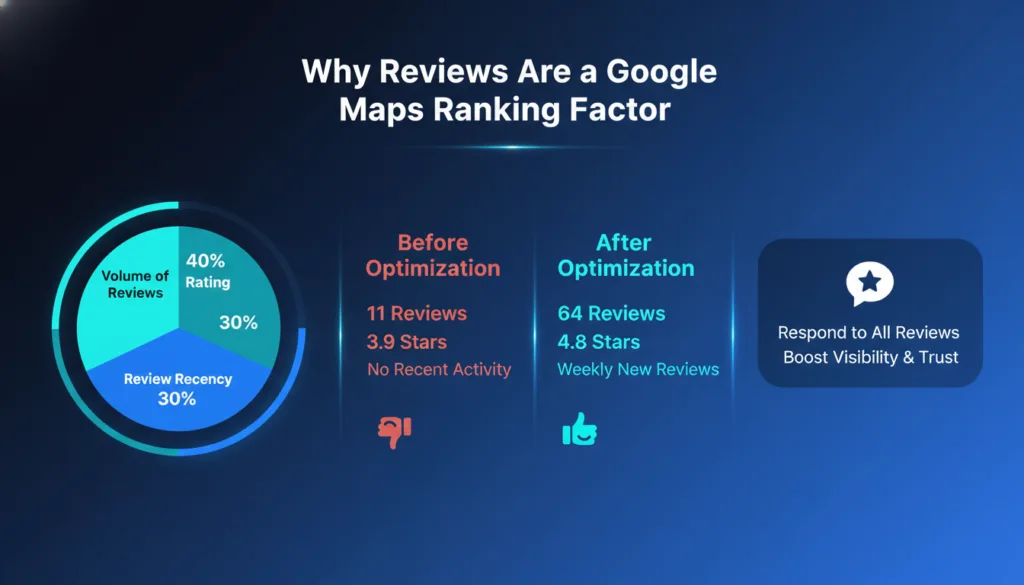
Reviews are not just about social proof. They are a direct ranking factor.
The best time to ask for a review is right after a positive experience. Train your team to ask at checkout or at the end of a service call.
Make it easy. Send a direct link to your Google review page in a follow-up text or email. The fewer clicks it takes, the more reviews you will get.
Never offer incentives for reviews. Google forbids it and can penalize your listing if they catch it.
When someone leaves a good review, thank them. Use their name if they included it. Mention a specific detail from their review. This shows you actually read it.
When someone leaves a bad review, stay calm. Apologies for the experience. Offer to fix the problem. Never argue. Other people read how you respond to bad reviews. It tells them a lot about how you treat customers.
One burst of 50 reviews followed by nothing is a red flag to Google. It looks like review manipulation.
Consistent reviews over time look natural. Try to generate at least a few new reviews every month. Even two or three a month is much better than a spike once a year.
When customers mention your services by name in their reviews, that is a bonus ranking signal. You cannot control what people write. But you can mention your services during the review request.
For example, you might say: “If you had a good experience with our roof repair service, we would love a review!”
Google also reads the sentiment of your reviews. More positive words mean a stronger trust signal.
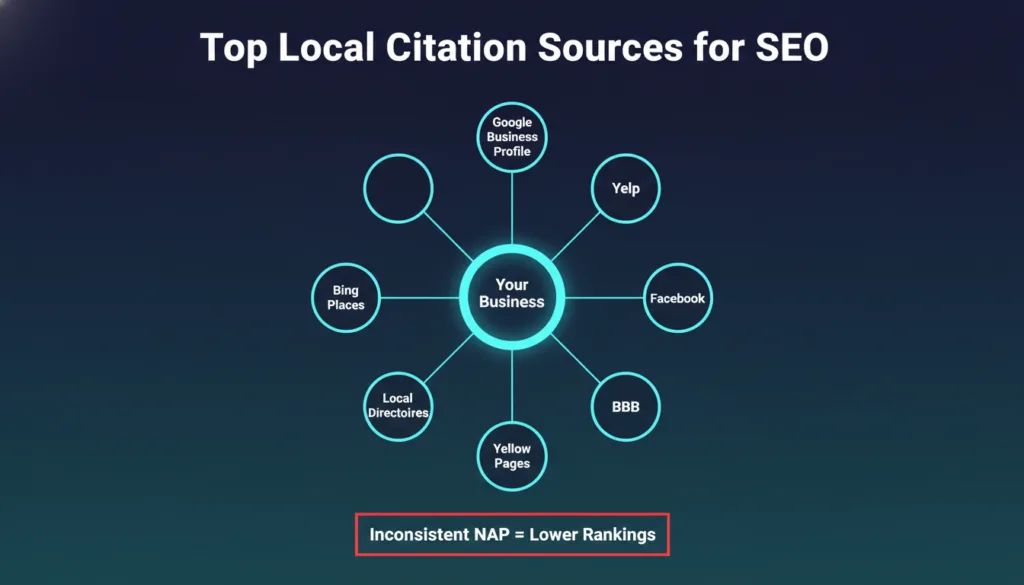
A citation is any place online that lists your business name, address, and phone number.
The most important citations come from:
Getting listed on these platforms is free. It takes time, but it is worth it.
Before you build new citations, fix the ones you already have. Search for your business name online. Look at every listing. Make sure your name, address, and phone number are exactly the same everywhere.
Even small differences matter. “123 Main St” and “123 Main Street” are technically different. Google may see them as two different businesses.
If your information is inconsistent across the web, cleanup comes first. Building more citations on top of messy data makes things worse.
Once your existing citations are clean and consistent, start building new ones. Focus on quality over quantity. A listing on a trusted directory is worth more than ten listings on spammy sites.
Your website and your Google Business Profile work together. A strong website supports stronger rankings.
If you serve multiple areas around Lafayette, create a separate page for each location. Each page should have unique content about that area. Do not just copy and paste with the city name changed.
Include the city name in the page title, the URL, the headings, and naturally in the body text. Add a Google Map embed. Mention local landmarks or neighborhoods if it makes sense.
These pages give Google strong signals that you genuinely serve those areas.
Every page on your site should be optimized for the right keywords.
Title tags should include your main keyword and your location. Example: “Pest Control Services in Lafayette, LA | Company Name.”
Meta descriptions should be clear and include a call to action. Keep them under 160 characters.
Header tags should break up your content and include local keywords where they fit naturally. Do not force it.
Schema markup tells Google extra information about your business in a language machines understand. Use the LocalBusiness schema on your homepage and location pages. Include your NAP, hours, and service area.
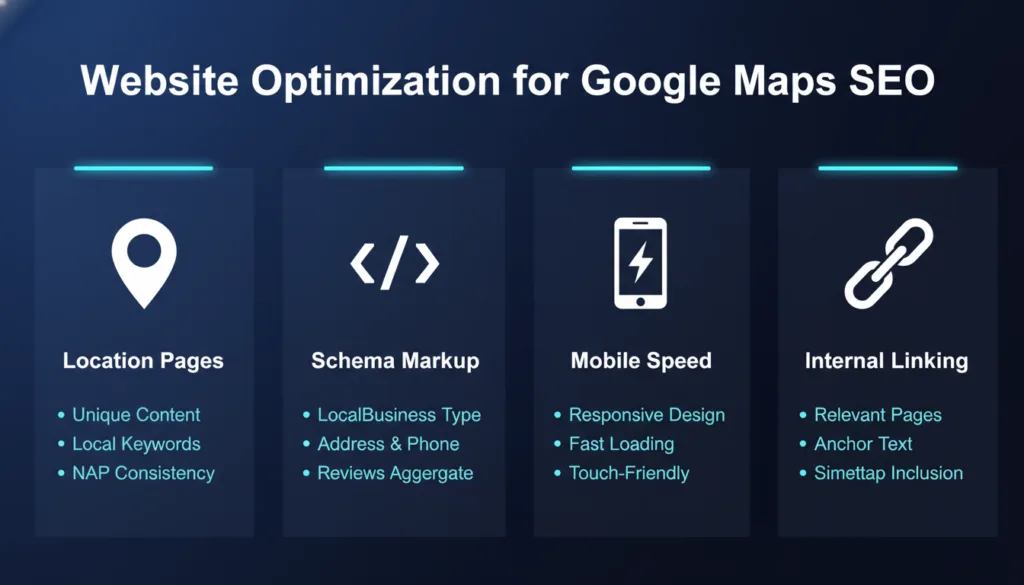
Most local searches happen on phones. If your site loads slowly or looks broken on mobile, people leave fast. Google sees that and ranks you lower.
Use Google’s PageSpeed Insights to check your site. Fix the issues it flags. A fast, mobile-friendly site is not optional anymore.
Do not just link your profile to your homepage. Link it to the most relevant page for each service or location.
If someone finds you on Google Maps and clicks your website link, they should land on a page that matches exactly what they searched for. A good landing experience leads to more conversions and better behavioral signals.
For a complete breakdown of how to put all of this together, check out our Local SEO Guide.
What people do after they see your listing tells Google a lot.
Your click-through rate (CTR) is the percentage of people who see your listing and click on it. A higher CTR means your listing is appealing.
To improve CTR, make sure your listing has great photos, a high review count, and a clear category. These are the things people see before they click.
Every call, direction request, and booking that comes through your Google listing is a signal. It tells Google that people are taking action because of your listing.
Make it easy for people to take action. Keep your phone number current. Enable messaging if you can respond quickly. Add a booking link if your business takes appointments.
Google personalizes results based on each user. It looks at their search history, their location, and their past behavior.
This means two people searching for the same thing from different places will see different results. You cannot control personalization directly. But you can show up more often by having a strong, complete, and active profile.
Google thinks of your business as an “entity.” An entity is a thing that Google can recognize and understand.
The more places your business name appears online, the more Google understands what you are. This means social media profiles, local news mentions, sponsorships, and community involvement all matter.
Be consistent. Use the same business name everywhere. Use the same logo. Use the same description. Consistency builds entity recognition.
A mention does not need a link to count. If a local blog writes about your business without linking to you, Google may still pick that up as a brand signal.
The key is consistency. Every time your name appears online, it should look exactly the same as it does on your Google Business Profile.
Google uses something called the Knowledge Graph to connect information about your business from across the web. It pulls in your social profiles, your website, your reviews, your citations, and news mentions to build a complete picture of who you are.
The stronger and more consistent that picture is, the more Google trusts you.
Local search is always changing. Here are the trends that matter most right now.
Google is using AI more and more to understand what people really want. A search for “good lunch spot” means something different to a college student than it does to a business professional.
AI helps Google figure out which business fits best for each person. This makes it more important than ever to have a fully detailed profile with lots of content for Google to read and understand.
Voice search is growing fast. People ask their phones questions like “What is the best pizza place near me?” These searches are longer and more conversational.
To rank for voice search, write your content in a conversational tone. Answer common questions directly. Include your location naturally in your content.
Google Lens lets people search by taking a photo. If someone photographs a storefront, Google tries to match it to a business listing.
Having clear, up-to-date photos of your exterior on your profile helps here. It also helps with regular search because listings with more photos get more engagement.
These mistakes are easy to make but hard to recover from.
Adding keywords to your business name is against Google’s rules. For example, changing your name from “Smith Plumbing” to “Smith Plumbing Best Plumber Lafayette, LA” is a violation.
Google can suspend listings that do this. Competitors can also report you. Keep your business name exactly as it appears on your legal registration.
Not responding to reviews is a missed opportunity. Responding badly to negative reviews is worse. Both hurt your ranking and your reputation at the same time.
Set aside time each week to check and respond to reviews. It only takes a few minutes and makes a real difference.
If your hours on Google say you close at 6 pm but your Facebook says 8 pm, customers get confused, and Google gets confused. Confused customers do not come back. Confused Google rankings go down.
Do a quarterly audit of your business information across all platforms. Keep everything in sync.
A bad mobile experience drives people away. A slow website does the same. Both tell Google that your business is not providing a good experience.
Test your site on your own phone right now. If anything looks broken or slow, fix it today.
You cannot improve what you do not measure.
These tools help you track where you rank in Google Maps:
Use at least one of these to track your progress month over month.
The numbers that matter most are:
Track these monthly. If a number drops, dig into why.
Search for your main keywords in Lafayette and look at who is ranking above you. Look at their profile. How many reviews do they have? How complete is their profile? Do they post regularly?
This tells you exactly what you need to do to compete. Close the gap on whatever they are doing better than you.
Here is a real-world example of what happens when you apply these factors correctly.
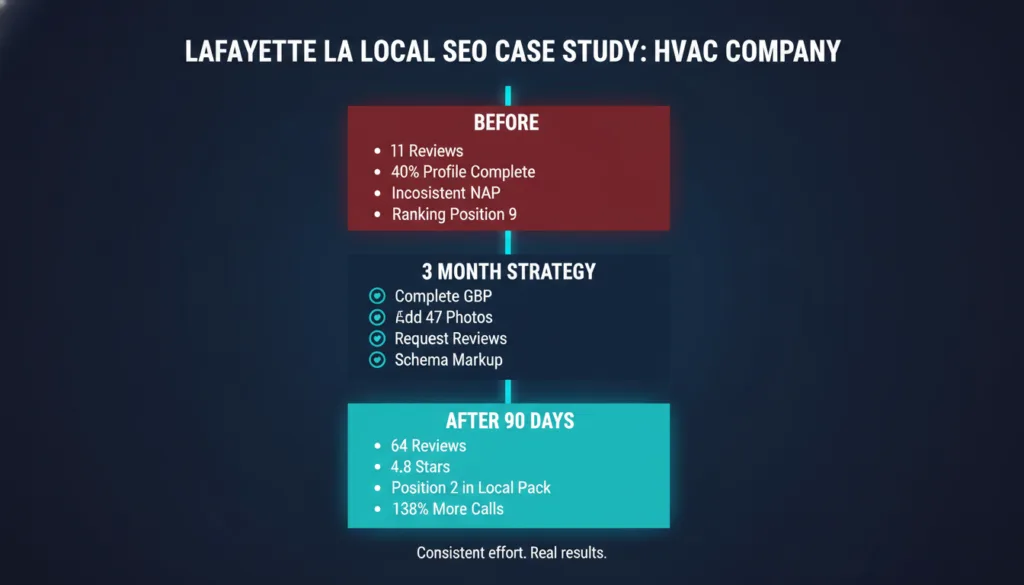
A local Lafayette, LA HVAC company was stuck on page two of Google Maps results. They had a Google Business Profile, but it was only 40% complete. They had 11 reviews from two years ago. Their NAP information was different in five different directories.
They were invisible to most local searchers.
Over three months, they made the following changes:
They completed their Google Business Profile from top to bottom. They added 47 new photos. They updated their NAP on every directory they could find. They started asking every customer for a review using a direct link sent by text. They published a Google Post every week. They added schema markup to their website and built three location-specific landing pages for nearby cities.
After 90 days, they moved from position 9 to position 2 in the Local Pack for their main keyword. Calls from Google Maps increased by 138%. Review count went from 11 to 64, with an average rating of 4.8.
The lesson is simple. These Google Maps ranking factors are not secrets. They are just steps. The businesses that follow the steps win.
Ranking on Google Maps is not about luck. It is about following a clear process and staying consistent.
Start with your Google Business Profile. Complete every field. Pick the right categories. Write a natural, keyword-rich description. Add photos. Post regularly. Respond to every review.
Then clean up your citations. Make sure your name, address, and phone number match everywhere. Build a few strong local links.
Optimize your website for local keywords. Create location-specific pages. Add schema markup. Make sure your site loads fast on mobile.
Then keep going. Track your rankings. Watch your competitors. Improve a little every month.
The businesses that rank at the top of Google Maps in Lafayette, LA, are not there by accident. They have done the work. Now you know exactly what that work looks like.
If you want hands-on help applying these Google Maps ranking factors to your business, our Local SEO Guide walks you through every step in detail.
